You may have come across the name: Microsoft Agent Framework. It’s Microsoft’s new open source framework for building AI agents — the official successor to Semantic Kernel and AutoGen, merged into a single project, available in .NET and Python.
The topic sounds intimidating: multi-agent orchestration, typed workflows, checkpointing, MCP… So let’s go through all of it with a single mental image: you’re building a small company, and your agents are your employees. Once that picture is in place, every feature of the framework becomes obvious. You’ll see: it’s not rocket science.
Where does it come from?
Two teams at Microsoft had been exploring this space for years: Semantic Kernel (the “enterprise” approach: robust, typed, telemetry) and AutoGen (the “research” approach: agents collaborating with simple abstractions). Agent Framework is their joint successor, built by the same teams: AutoGen’s simple abstractions, Semantic Kernel’s solid foundations, and on top of that, workflows to keep control.
On the model side, it’s agnostic: Microsoft Foundry, Azure OpenAI, OpenAI, Anthropic, Ollama running locally… You can switch providers without rewriting your agents.
The employee: what is an agent?
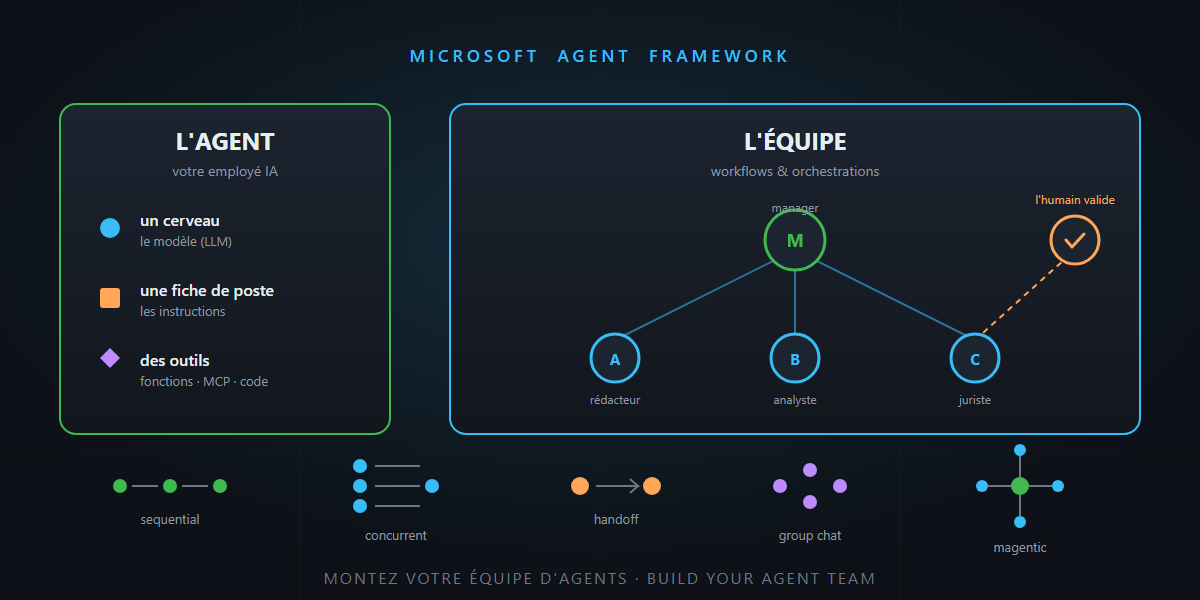
In this framework, an agent is three things:
- a brain: the large language model (LLM);
- a job description: the instructions (“you are a travel advisor, you answer in French…”);
- tools: what it’s allowed to do beyond talking.
And the code really looks like that — here’s a complete agent in C#:
AIAgent agent = chatClient.CreateAIAgent(
    instructions: "You are a travel advisor. Be concrete and practical.",
    tools: [AIFunctionFactory.Create(GetWeather)]);

var response = await agent.RunAsync("What should I do in Lisbon on a March weekend?");
That’s it. The framework handles the loop: the model thinks, calls a tool if needed, reads the result, iterates, then answers.
The golden rule before hiring
The official documentation says it itself, which is rare enough to be worth framing: if a plain function can do the job, write a function. No agent.
| Hire an agent when… | Write a workflow when… |
|---|---|
| the task is open-ended, conversational | the process has well-defined steps |
| you need autonomy and improvisation | you want explicit control over execution order |
| an LLM (with tools) is enough | multiple agents/functions must coordinate |
An agent is powerful but non-deterministic — it improvises. A workflow is a procedure — it can be audited. The framework gives you both, and the art is in combining them.
Tools: the employee’s equipment
An employee without tools can only chat. Agent Framework ships three families of them:
- Function tools — the in-house toolkit. Your own C# or Python methods, exposed to the agent: they run inside your application, with your business logic, your access, your tests. Most agents start here.
- Hosted tools — the equipment that comes with the workstation. Code interpreter (a sandbox to execute code), web search, file search: they run on the model provider’s infrastructure, nothing to install, nothing to maintain.
- MCP servers — the universal plug. Any existing MCP server (GitHub, databases, internal tools…) plugs into your agent, locally or hosted.
MCP or built-in tool: what’s the difference?
The question comes up every time: if the framework can already declare tools, why go through MCP?
A function tool is a skill taught to this employee, in this company. The method lives in your application, it’s written for this agent and serves it alone. It’s fast, typed, testable — but it’s private.
An MCP server is an external contractor with its own service catalog. It runs in a separate process (on your machine or remotely) and exposes its tools through an open, standard protocol. The direct consequence: the same GitHub MCP server serves your Agent Framework agents, GitHub Copilot, Claude, VS Code… Written once, plugged in everywhere. And when the server gains new tools, every connected agent benefits without a redeploy.
| Function tool (built-in) | MCP server | |
|---|---|---|
| Who writes the code | you, in your app | the server’s provider (you or a third party) |
| Where it runs | in your process | in a separate process, local or remote |
| Reusable elsewhere | no — tied to your app | yes — same server for Copilot, Claude, your agents… |
| Rule of thumb | business logic specific to the app | existing integration, or one shared across AI tools |
The simple reflex: your business logic → function tool; an integration that already exists or must serve several agents → MCP. One word of caution along the way: a third-party MCP server is external code you hand data to — the same caution reflexes as in the security article apply.
And the bridge works both ways: an Agent Framework agent can itself be exposed as an MCP server. Your agent then becomes a pluggable tool in VS Code or any compatible client.
Whatever the family — in-house, hosted or MCP — one feature is reassuring: tool approval. You can mark any tool as “approval required”: the agent prepares the action, everything stops, a human approves (or not), and it resumes. The intern fills in the purchase order, but the manager signs it.
Memory: the conversation thread and the customer file
Two distinct mechanisms, two different needs:
Sessions are the memory of the current conversation: the agent remembers what you said three messages ago. The framework manages that state for you, including for long-running server-side processes.
Context providers are smarter: they’re components that run before every response to put in front of the agent exactly what it needs — the customer’s profile, their preferences, relevant documents pulled from a knowledge base (the famous RAG). The nuance matters: a tool is something the agent has to think of using; a context provider is the file already sitting on its desk before the meeting. After the response, the provider can also extract and store what’s worth remembering (“this customer is vegetarian”) for next time.
Quick reminder along the way: everything you inject into the context is input tokens paid on every turn — the framework even ships compaction strategies to summarize history when it grows too long.
Middleware: the company policy
Middleware wraps every action of the agent: before/after each model call, each tool call. That’s where cross-cutting concerns live: logging what the agent does, filtering inputs and outputs (guardrails, sensitive data), measuring, blocking when needed. The agent does the work; the company policy frames it — without touching its job description.
Agents as tools: the generalist calling the specialist
As an agent accumulates tools and responsibilities, it gets worse — too many tools and it picks badly; too broad a job description and it loses focus. The framework’s answer: an agent can call another agent as if it were a regular tool.
Your generalist assistant keeps a clear role, and when the question touches flight booking, it delegates to the travel agent — which has its own instructions, its own tools, and possibly… a different model. A small, fast model for simple tasks, a big one for reasoning. Just like a real team: everyone has their specialty.
Workflows: the company procedure
So far, an agent picks its own route. For a business process, you want the opposite: explicit steps, in a controlled order. That’s what workflows are for: a graph whose nodes are agents or plain functions, connected by typed edges — with conditional routing, parallel execution, and type validation between steps.
Two features are worth the detour:
- Checkpointing: the workflow state is saved at checkpoints. A process running for hours (or days) can be interrupted and resume where it left off — essential the moment a human enters the loop.
- Human-in-the-loop: the workflow can pause to ask a human for information or approval, then resume. The loan application is processed automatically, but the final approval remains a human signature.
Icing on the cake: a workflow can be exposed as an agent. From the outside, you talk to it like a regular agent — without knowing a full procedure is running behind it.
The five ways to organize the team
This is the framework’s best-known part: the built-in orchestrations, five ready-made patterns for making multiple agents collaborate.
| Pattern | The image | Concrete case |
|---|---|---|
| Sequential | The assembly line: each one hands over to the next | Write → review → translate → publish |
| Concurrent | The brainstorm: everyone works the same topic in parallel | Analyzing a contract from the legal, financial and technical angles at once |
| Handoff | The switchboard: you get transferred to the right department | Customer support: billing, technical or sales depending on the question |
| Group Chat | The team meeting: everyone debates in the same thread | A writer and a critic iterating until the text is final |
| Magentic | The project manager: splits, delegates, adjusts the plan in real time | Open-ended problem where the path isn’t known in advance |
The choice isn’t cosmetic. Sequential when steps depend on each other. Concurrent when they’re independent (and latency matters). Handoff to route to specialists. Group Chat for confronting ideas. Magentic — inspired by AutoGen’s Magentic-One system — for open-ended tasks: a manager agent plans and coordinates specialists based on progress. It’s the most flexible… and the most token-hungry; if simple coordination is enough, the docs themselves recommend sticking to Group Chat.
Observability: the dashboard
An improvising agent needs monitoring. The framework ships OpenTelemetry as standard: traces of model calls, invoked tools, workflow steps — down to “zero-code” setup via environment variables. When an agent goes off the rails at 3 a.m., you replay the tape instead of guessing.
Where to start?
# .NET
dotnet add package Microsoft.Agents.AI.Foundry --prerelease

# Python
pip install agent-framework
The official entry point: learn.microsoft.com/agent-framework. If you’re coming from Semantic Kernel or AutoGen, dedicated migration guides exist. And the samples in the GitHub repository cover every feature in this article.
My advice for getting started: one agent, two or three function tools, one session. That’s already useful in production. Multi-agent orchestrations will come when a real need justifies them — not before.
In summary
- Agent Framework = the open source successor to Semantic Kernel + AutoGen, in .NET and Python, model-agnostic.
- An agent = a brain (LLM) + a job description (instructions) + tools (functions, MCP, code interpreter…).
- The golden rule: if a function is enough, write a function. Agent for the open-ended, workflow for the procedural.
- Sessions and context providers provide memory; middleware frames it; tool approval and human-in-the-loop keep humans in charge.
- Five orchestrations for the team: assembly line, brainstorm, switchboard, meeting, project manager.
Building a team of AI agents, in the end, is like building any team: clear job descriptions, the right tools, a company policy, and a manager who signs the purchase orders. And that, honestly… is not rocket science.