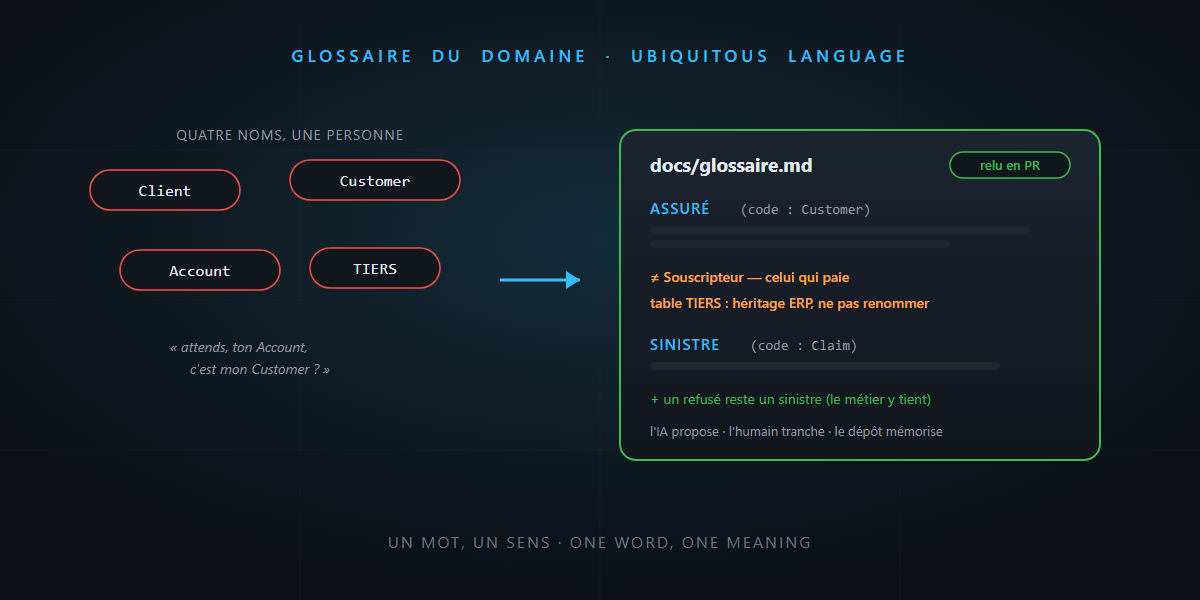
Open any project older than six months and search for “client”. You’ll find Client, Customer, Account, User — and, in the database, a table called TIERS. Four names, five if you count the business folks who say “the insured”. The same person? Almost. Almost is the problem.
After ADRs — the memory of your decisions — here’s the second piece of a repository that talks: the domain glossary. One Markdown page, ten minutes of writing, and probably the best effort-to-value ratio in your entire documentation. You’ll see: it’s not rocket science.
Semantic drift: a silent disease
Nobody decides one morning to call the same thing four different names. It just happens: dev A says Customer because it’s the natural English, dev B creates Account because he’s thinking billing, the sprint-9 consultant introduces Tiers because that’s the vocabulary of the ERP next door. Each choice is reasonable; their sum is a minefield.
The cost is very real: every conversation starts with three minutes of synchronization (“wait, your Account is my Customer?”), every mapping bug comes from a forgotten nuance, and every newcomer learns the local dialect the hard way.
Domain-driven design has a name for the cure: the ubiquitous language — a single vocabulary shared between the business, the code and the docs. The glossary is its simplest form: the version that fits on one page.
One Markdown page, not a wiki
The format that works is the dumbest one: a docs/glossary.md file in the repository, versioned and reviewed in pull requests — exactly like ADRs. Not an external wiki that will live its own life (that is, die its own death) far from the code.
# Domain glossary

## Insured (code: `Customer`)
The natural person covered by a policy. Can exist
without an active policy (converted prospect, cancelled policy).
- ≠ **Policyholder**: the one who pays. Often the same, not always.
- Database: table `TIERS` (ERP legacy, do not rename).

## Policy (code: `Policy`)
The signed commitment. One insured can hold several policies.
- "Contract" is banned from the code: `Policy` in code, policy in meetings.
- Possible statuses: see ADR-0012.

## Claim (code: `Claim`)
Any declaration of a covered event — even if later rejected.
- A **rejected claim is still a claim** (the business insists).
Notice the three ingredients of each entry: the business term, the exact name in the code, and the traps (“≠ policyholder”, “rejected is still a claim”). The differences section is where the gold is — a glossary that only lists synonyms teaches nobody anything.
When a term deserves an entry
As with ADRs, selectivity is the value. The test:
| The term… | Entry? |
|---|---|
| has two meanings depending on who’s talking (“account”, “file”) | ✅ yes, urgently |
| is said differently in code than in meetings | ✅ yes |
| has close false friends (insured/policyholder) | ✅ yes |
is standard technical vocabulary (Controller, DTO) |
❌ no |
| appears in only one file | ❌ not yet |
Twenty living entries beat two hundred dead ones. If everyone understands a word the same way, it has no business being in the glossary.
Why it’s worth double in the AI-agent era
A human who hesitates about a term asks the person next to them. An AI agent decides in silence — and it decides statistically: it generates Customer here, Client there, invents an AccountHolder next sprint, and cheerfully propagates each variant into tests, migrations and comments. Semantic drift at LLM speed.
The glossary flips the situation, for three reasons:
- It’s solid-gold context. Reference
docs/glossary.mdfrom your agent instructions (“respect the glossary names”): the AI names things right from the first generation, in the code and in its explanations. - The AI drafts it very well. “List the business terms in this module and their suspicious synonyms in the code” is a task where the agent excels — it spots inconsistencies faster than a human. The ADR division of labor applies as-is: the AI proposes, the human decides, the repository remembers.
- It disambiguates your prompts. “Add validation on the insured” is a fuzzy prompt; with the glossary in context, the agent knows the insured is
Customer, distinct from the policyholder, and that the table is calledTIERS. Fewer assumptions, fewer invented answers.
The honest word
- A glossary renames nothing. Writing “
TIERSis ERP legacy” doesn’t clean up the debt — it illuminates it. That’s already a lot: documented debt stops biting newcomers. The renaming itself is a decision… that deserves an ADR. - It dies without a guardian. A glossary that isn’t reviewed in PRs becomes wrong, and a wrong glossary is worse than no glossary. The guardrail: any PR that introduces a new business term also touches the glossary — one line in your review checklist is enough.
In summary
- Semantic drift — four names for the same thing — costs misunderstandings, mapping bugs and painful onboarding; AI accelerates it if you let it name things at random.
- The cure fits on one page:
docs/glossary.md, versioned, reviewed in PRs — business term, exact name in the code, and above all the traps and false friends. - You include terms that are ambiguous, translated or treacherous — not standard technical vocabulary. Twenty living entries beat two hundred dead ones.
- With agents: the AI proposes entries, the human decides, and a glossary referenced in the instructions makes the first generation name things right.
Ten minutes to write the first page, one line in the review checklist to keep it alive — and never again an “Account or Customer?” debate at the coffee machine. And that, honestly… it’s not rocket science.