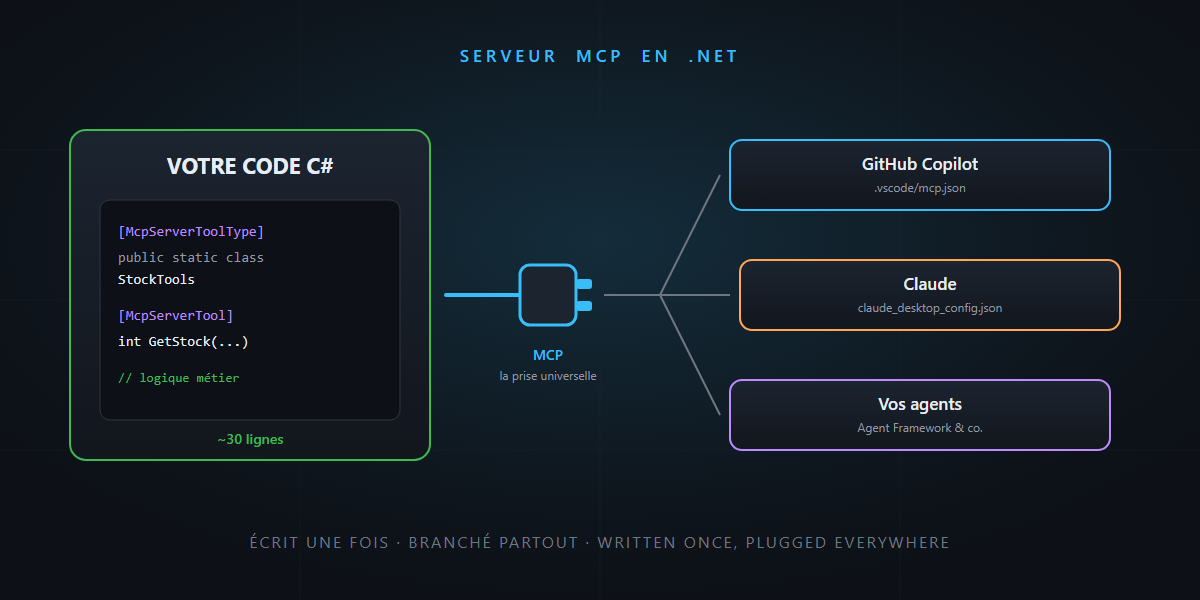
In the last few articles, MCP kept coming back under the same nickname: the universal plug. We plugged it into GitHub Copilot, into Agent Framework, we learned to be careful with it… but we never built one.
Today we switch sides: your own MCP server, in C#, in about thirty lines. Your business logic becomes a tool that Copilot, Claude or your agents can call. You’ll see: it’s not rocket science.
The thirty-second recap
MCP (Model Context Protocol) is an open standard that defines how an AI application discovers and calls external tools. Three roles:
- The host: the AI application (VS Code with Copilot, Claude, your agent…).
- The server: your program, exposing a catalog of capabilities.
- The client: the part of the host that talks to the server, over a common protocol (JSON-RPC).
And in a server’s catalog, three kinds of items:
| Primitive | What it is | Example |
|---|---|---|
| Tools | actions the model can invoke | “give me the stock level for product X” |
| Resources | documents to read | the product catalog, a config file |
| Prompts | ready-made conversation templates | “analyze this ticket in support format” |
The company image, as always: an MCP server is an external contractor with a service catalog. Today we create the contractor — starting with tools, the number-one use case.
Why build your own?
Because it’s the answer to “I want the AI to access my business data”. Without MCP, you write one integration per AI tool: a VS Code extension here, a plugin there, a connector somewhere else. With MCP: you write the server once, and anything that speaks MCP can plug into it — Copilot, Claude, an Agent Framework agent, tomorrow’s tool.
It’s the “written once, plugged in everywhere” argument from the Agent Framework article — except this time, you’re the provider.
The code: a server in thirty lines
Microsoft and the MCP project maintain an official SDK: the ModelContextProtocol NuGet package (stable 1.x line). We create a regular .NET console app:
dotnet new console -n MyMcpServer -f net10.0
cd MyMcpServer
dotnet add package ModelContextProtocol
dotnet add package Microsoft.Extensions.Hosting
And here is Program.cs, in full:
using Microsoft.Extensions.DependencyInjection;
using Microsoft.Extensions.Hosting;
using Microsoft.Extensions.Logging;
using ModelContextProtocol.Server;
using System.ComponentModel;

var builder = Host.CreateApplicationBuilder(args);

// Trap #1 (more on this below): logs go to stderr, never stdout.
builder.Logging.AddConsole(o => o.LogToStandardErrorThreshold = LogLevel.Trace);

builder.Services
    .AddMcpServer()
    .WithStdioServerTransport()
    .WithToolsFromAssembly();

await builder.Build().RunAsync();

[McpServerToolType]
public static class StockTools
{
    [McpServerTool, Description("Returns the stock level of a product from its reference.")]
    public static int GetStock(
        [Description("The product reference, for example SKU-1234.")] string reference)
        => StockDb.Lookup(reference); // your real business logic here

    [McpServerTool, Description("Searches products by keyword in the catalog.")]
    public static IEnumerable<string> SearchProducts(
        [Description("The search keyword, for example 'keyboard'.")] string keyword)
        => StockDb.Search(keyword);
}
That’s it. Let’s unpack what just happened:
- An MCP server is an ordinary .NET application:
Host.CreateApplicationBuilder, dependency injection, nothing exotic. [McpServerToolType]+[McpServerTool]: a class, some methods — andWithToolsFromAssembly()discovers them on its own. The SDK generates the JSON schema from the signature: your typed C# parameters become the tool’s contract.WithStdioServerTransport(): the server communicates through standard input/output — the host launches it as a child process. Perfect locally.
The two traps that break everything
Trap #1: stdout is sacred. With STDIO, standard output is the protocol channel. A single Console.WriteLine("starting...") in your code — or a chatty library printing a banner — and the client drops the connection with a parse error. Hence the logging-to-stderr line at the very top of the program, before everything else. If your server “doesn’t respond”, that’s suspect number one.
Trap #2: vague descriptions. The [Description] attributes aren’t decoration: they’re the catalog’s shop window, the exact text the model reads to decide whether to use your tool and how to fill it in. “Returns data” = tool never called. “Returns the stock level of a product from its reference” = tool used properly. Treat them like public documentation — deep down, that’s what they are.
Plugging it in
For VS Code / Copilot, create .vscode/mcp.json in your workspace:
{
  "servers": {
    "my-stock": {
      "type": "stdio",
      "command": "dotnet",
      "args": ["run", "--project", "${workspaceFolder}/src/MyMcpServer"]
    }
  }
}
Open Copilot chat in agent mode and ask: “what’s the stock for SKU-1234?”. Copilot discovers GetStock, calls it, answers with the real value. Your code just entered the conversation.
For a comfortable dev loop, the official debugging tool is MCP Inspector: it launches your server, lists its tools and lets you call them by hand from a web UI —
npx @modelcontextprotocol/inspector dotnet run --project ./MyMcpServer
Going further
- STDIO or HTTP? STDIO for a local server launched by the client. For a remote, shared server (a team API), the SDK offers the Streamable HTTP transport via the
ModelContextProtocol.AspNetCorepackage — same tool code, different wiring. (The historical SSE transport is deprecated: ignore it in older tutorials.) - Resources and prompts: same mechanics as tools, with
[McpServerResourceType]and[McpServerPromptType]— remember to register them (WithResources<T>(),WithPrompts<T>()), otherwise they’re invisible. - Full circle: remember the Agent Framework article — an agent can itself be exposed as an MCP server. Your contractor can be… a whole team.
A word of honesty, on the security side: an MCP server is code that runs with your permissions and that models will drive. The reflexes from the security article apply in both directions: least privilege for what your server can do, input validation (the model can send anything as a parameter), and no secrets in the responses — everything your tool returns goes into the model’s context.
In summary
- An MCP server = a catalog (tools, resources, prompts) exposed through a standard protocol — written once, plugged into Copilot, Claude, your agents.
- In .NET: the
ModelContextProtocolpackage (stable 1.x), an ordinary console app,[McpServerTool]+[Description]attributes — the SDK does the rest. - The two traps: stdout reserved for the protocol (logs to stderr) and vague descriptions (the shop window the model reads).
- Test with MCP Inspector, plug in with three lines of JSON, and Streamable HTTP when you need to share.
The universal plug, seen from the inside, is a .NET console app with two attributes. Your business logic inside the AI’s conversation, within a lunch break. And that, honestly… is not rocket science.