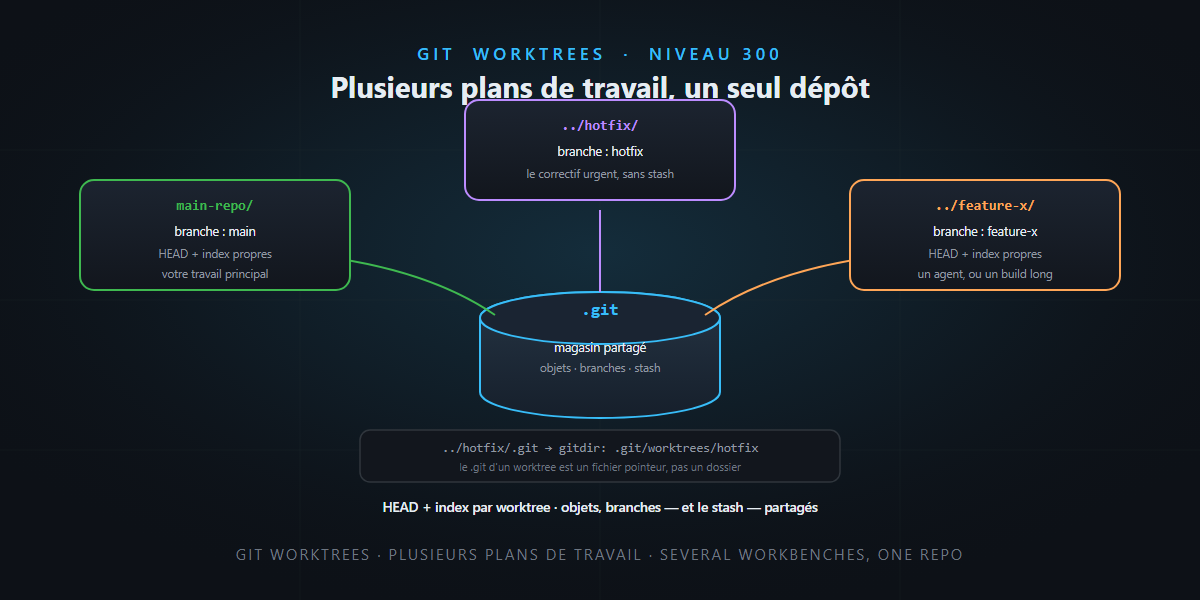
The scene is universal. You’re deep in a feature, fifteen files open, fully in the zone — and the urgent hotfix lands. The reflex: git stash, git switch main, fix it, come back, git stash pop, and pray nothing moved in between. Or, the brute-force version, a full git clone of the repo into another folder. Both work. Both are wasteful. Git has had, since version 2.5, a tool cut exactly for this: worktrees. Several working trees on the same repository, each on its own branch, all at once.
We often meet them at the surface (“spin up a worktree, run your agent in it”). Today, level 300: we open the hood, look at what Git actually writes to disk, and map the traps — one of them genuinely counter-intuitive. Not rocket science.
The mental model: the workshop and its workbenches
A Git repository is two things we habitually conflate:
- the store — the history, the commits, the branches, the objects: everything living in
.git/; - the working tree — the actual files you edit, a projection of a given commit.
A git clone duplicates both. A worktree, instead, adds one more working tree wired to the same store. The workshop — the materials (objects) and the task board (branches) — is shared; each workbench just holds its piece under assembly. Hence the win: no re-download, no duplicated history, and a commit made on one bench is instantly visible from the others.
Under the hood: what Git actually writes
This is where level 300 begins. Let’s create a worktree and watch:
git worktree add ../hotfix -b hotfix
First shock: inside ../hotfix, .git is not a directory — it’s a one-line file:
gitdir: /path/to/main-repo/.git/worktrees/hotfix
It points to an administration folder created in the main repo, .git/worktrees/hotfix/, which contains:
HEAD index logs/ refs/ ORIG_HEAD gitdir commondir
In other words, each worktree owns its own HEAD and its own index (the staging area), while the commondir file (../..) points back to the shared .git for everything else. That separation is all the magic — and all the source of the traps. Let’s summarize:
| Per worktree | Shared across the whole repo |
|---|---|
| the working tree (the files) | the objects (commits, blobs, trees) |
HEAD (the current branch) |
the branches (refs/heads/*) |
the index (staging) |
the tags, the remotes |
the HEAD reflog, the bisect state |
the repo config |
refs/worktree/* (private refs) |
the stash ⚠️ |
Remember the bottom line: the stash is global to the repo, not per worktree. We’ll come back to it — it’s trap #1.
The commands that matter
# create, on a new branch
git worktree add ../feature-x -b feature-x

# create, on an existing branch (e.g. to review a PR)
git worktree add ../review-123 origin/pr-123

# create in detached HEAD, for a throwaway experiment
git worktree add --detach ../spike HEAD

# take inventory (scriptable)
git worktree list --porcelain

# remove cleanly (refuses if the worktree is "dirty")
git worktree remove ../feature-x

# clean up phantom entries after a manual deletion
git worktree prune -v

# protect a worktree on removable/network disk from pruning
git worktree lock ../on-usb
Two pro reflexes: list --porcelain for any automation script (stable, machine-readable output), and always remove rather than rm -rf (we’ll see why).
The traps — the real level 300
1. One branch = one worktree. You cannot check out the same branch in two benches:
fatal: 'feature' is already used by worktree at '.../feature-x'
Often-forgotten corollary: you also can’t check out main in a second worktree if the main one is already on it. It’s a protection — two working trees writing the same branch would be chaos — but it surprises people at first.
2. The stash is shared — the trap that costs you an hour. You run git stash in worktree A, switch to worktree B, and… your stash is there too, mixed in with the others. The stash isn’t filed per bench: it’s a drawer common to the whole workshop. Across several active worktrees, prefer a real temporary commit (git commit -m wip) over a stash you might pop in the wrong place.
3. Untracked files don’t follow. A fresh worktree is a projection of commits — therefore empty of everything not in Git: .env, node_modules/, target/, your build caches, your local secrets. It’s intentional (isolation is the point), but you’ll need to reinstall dependencies and re-copy config for each new bench. A direnv or a bootstrap script works wonders here.
4. Never delete a worktree with rm -rf alone. The folder vanishes, but the admin entry stays — a phantom worktree. Git will tell you at the next prune:
Removing worktrees/hotfix: gitdir file points to non-existent location
Use git worktree remove (which, by the way, refuses if changes aren’t committed — --force to override), and git worktree prune to sweep inherited phantoms.
5. Hooks and config are common. core.hooksPath and the repo config are shared by all worktrees. For one bench to diverge (rare, but handy), enable extensions.worktreeConfig then write with git config --worktree. Without it, a setting in one worktree affects everyone.
6. Submodules and heavy tooling. Each worktree needs its own git submodule update, and some IDEs index multiple working trees of the same repo poorly (file watchers, language caches). Nothing blocking, but worth knowing before you multiply benches.
Worktree, stash or clone: which, when?
| Your need | The right tool |
|---|---|
| A 2-minute round trip on the same branch | git stash |
| A hotfix during an in-progress feature | worktree |
| Reviewing a PR without breaking your environment | worktree (--detach or the PR branch) |
| Letting a long build run while you code elsewhere | worktree |
| Working on a different remote / a fork | git clone |
| Isolating several agents editing in parallel | worktree (one per agent) |
The rule: stash for the short interruption, clone for a genuinely separate repo, worktree for sustained parallelism on one history. Between the two extremes, it’s almost always the worktree that wins.
In the age of agents
That last use case is becoming the main one. A coding agent is a working tree in motion; three agents in parallel on the same repo, without worktrees, is three agents overwriting each other’s files. One worktree per agent, and the problem disappears: disjoint file scopes, main directory intact for your own work. Modern harnesses automate it — Copilot CLI made it a /worktree command, and Claude Code can launch a subagent inside a throwaway worktree, auto-cleaned if it changed nothing. The mechanics you just dissected are exactly what runs under those commands — and the “one branch per agent” model is its natural extension.
A word of honesty
- A worktree isn’t free: objects are shared, but the working tree is genuinely on disk — one
node_modules/per bench eventually adds up. On a large monorepo, count the cost. - The real danger is zombie worktrees: created for a task, forgotten for three weeks, slowly diverging and recreating the confusion you were fleeing. Non-negotiable hygiene: one bench per task,
removeas soon as the branch is merged,prunenow and then. - It’s neither a replacement for branches nor for clone: it’s the tool for one precise case, local parallelism on one repo. Outside that case, keep it simple.
In short
- A worktree = one more working tree on the same object store — not a clone, not a duplicated history.
- Under the hood:
.gitbecomes a pointer file; each worktree has its ownHEADandindex, but objects and branches are shared. - Three traps to burn in: one branch = one worktree, the stash is global, and untracked files don’t follow.
- Delete with
git worktree remove+prune, neverrm -rfalone. - Trade-off: stash (short), clone (other repo), worktree (sustained parallelism) — and one worktree per agent in the AI era.
The worktree is the tool that turns “I’ll wait for the build to finish before working” into “I work elsewhere while it builds.” Once adopted, there’s no going back — and you record the workflow choice, of course, in an ADR. And that, honestly… is not rocket science.