Final episode of the series. You know why, you’ve mastered the daily routine, you’ve built the team. What remains is the dimension that changes the job: working in several places at once — delegating to the cloud, parallelizing local worksites, scheduling recurring tasks, and embedding the agent in your scripts and CI.
This is the “multiplication” episode. You’ll see: it’s not rocket science.
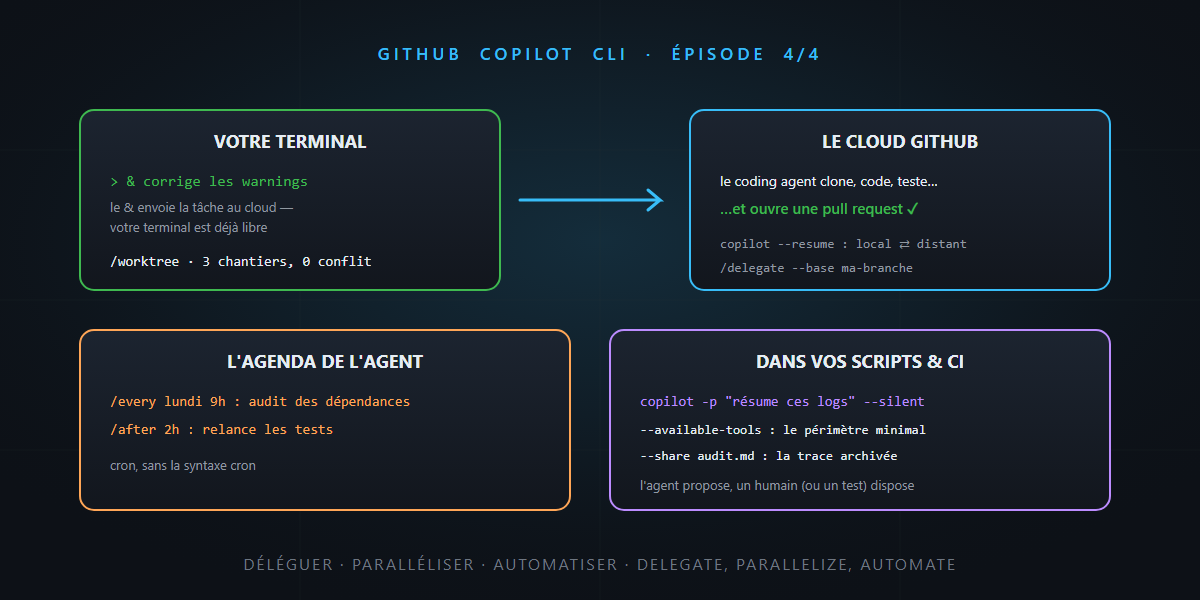
The magic &: delegate to the cloud coding agent
The tool’s most spectacular gesture fits in one character. Prefix your request with &:
& fix the three nullability warnings in OrderService and open a PR
…and the task ships off to the Copilot coding agent, in GitHub’s cloud. Your terminal is immediately free: the remote agent clones, works in its isolated environment, pushes a branch, opens the pull request. Meanwhile, you move on to something else — or close the laptop.
copilot --resumelists your local and remote sessions — you switch between them like between two windows./delegate --baseeven targets the base branch for the PR to create.
The reading grid is familiar: local work for what needs your fine supervision, cloud delegation for well-scoped, verifiable tasks. The local intern, the team at headquarters — and you arbitrate.
Worktrees: three worksites, zero conflicts
Another form of parallelism, local this time: /worktree creates an isolated git worktree — a lightweight clone on a dedicated branch — and runs the job there. Three refactorings in parallel? Three worktrees, three sessions, zero file conflicts; your main directory stays clean. You can even create a worktree straight from the pull requests screen, to test a PR without touching your workspace.
Attentive readers will have recognized this isolation pattern: it’s how agents work in parallel without stepping on each other — applied to your worksites.
/every and /after: the agent takes appointments
Discreet but delightful: built-in scheduling, in natural language:
/every monday 9am: check for outdated NuGet dependencies and summarize important updates/after 2h: rerun the integration tests and tell me the result
Cron without the cron syntax. Recurring watch, end-of-day checks, post-deployment reminders: micro-tasks that no longer depend on your memory.
Programmatic mode: the agent in your scripts
The tool’s hidden face, and perhaps its most powerful: copilot -p executes one task with no interface, like any Unix command:
copilot -p "summarize the errors in this log file and propose a root cause" \
  --silent < build.log
The options that matter:
| Option | What it does |
|---|---|
-p "…" |
the task, in one command |
--silent |
clean output, usable in a pipe |
--available-tools / --excluded-tools |
the tool allowlist/denylist — the automation guardrail |
--additional-mcp-config |
plug in an MCP server for this run |
--share path.md / --share-gist |
export the transcript as Markdown or a gist |
And for CI: authentication adapts to browserless environments (GITHUB_ASKPASS variable, tokens), HTTPS proxies are handled — the agent runs in a GitHub Actions runner just like on your machine.
Responsible automation: the checklist
An unsupervised agent is a storyteller who can embroider with nobody proofreading. Before putting copilot -p in a cron or a CI, the series’ checklist:
- Minimal perimeter:
--available-toolsreduced to the strict necessary — an agent that summarizes logs doesn’t need to write files. - Bounded sandbox and network: the OS sandbox and
allowed_urlsapply in automation too — especially there. - Verifiable output: the agent proposes, a human (or a test) disposes — a PR to review rather than a direct push, evals rather than trust for whatever runs in a loop.
- Traceability:
--sharearchives the transcript — who did what, and why.
In summary — and end of series
&delegates to the cloud (PR on arrival),/worktreeparallelizes locally,/every//afterschedule — you’re no longer limited to one worksite at a time.copilot -p+--silent+ allowlists: the agent becomes a script and CI building block, with exportable transcripts.- Automation gets fenced in: reduced tools, sandbox, reviewed output, traces.
The series in one sentence: Copilot CLI started as a chat in the terminal and became a complete team — briefed by your foundations, equipped by your MCP servers, framed by hooks, working in your terminal, in the cloud and in your CI. Why should you use it? Because it’s where every building block of this blog comes together — and deep down, you know it by now… it’s not rocket science.