So far, Copilot CLI looked like one excellent employee in your terminal. Today, change of scale: there’s a whole team hiding in there — built-in specialists working in parallel, your own custom agents, skills as Markdown files, plugins, and of course the MCP plug.
If you’ve read the Agent Framework article, brace for intentional déjà-vu: the same ideas, already in production in an everyday tool. You’ll see: it’s not rocket science.
The built-in specialists: automatic delegation
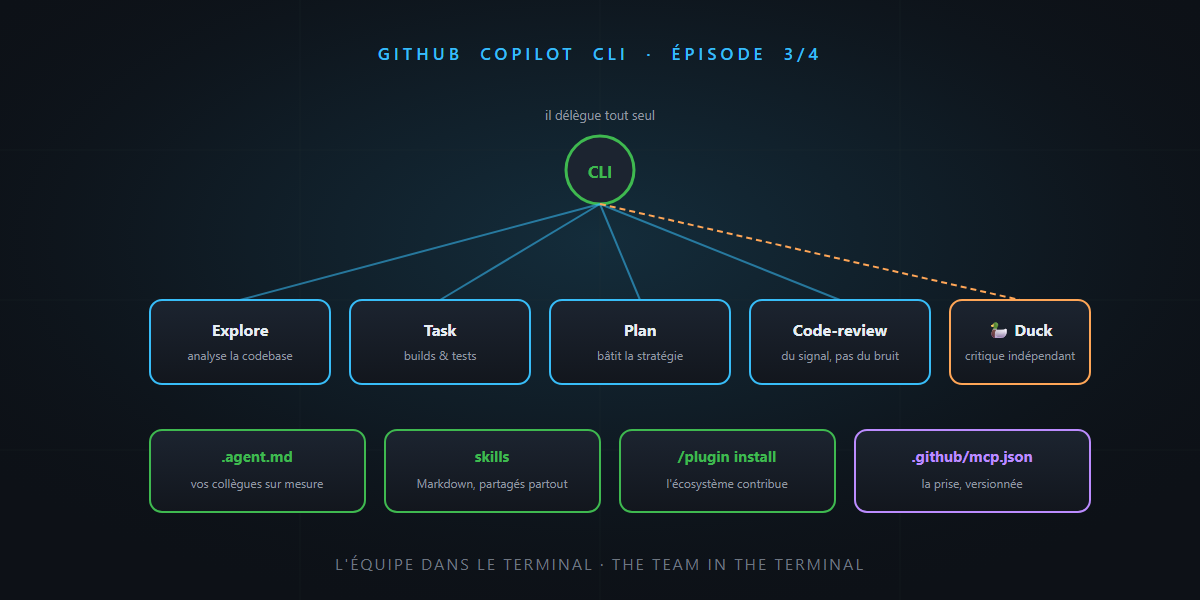
Ask for something ambitious and watch the timeline: Copilot CLI doesn’t do everything itself. It delegates to specialized agents, which work in parallel and report only the essentials:
| Agent | Its specialty | What it saves you |
|---|---|---|
| Explore | analyzing the codebase, answering questions | exploration doesn’t pollute your main context |
| Task | running builds and tests | brief summary on success, full output on failure |
| Plan | building a plan by examining dependencies and structure | Plan mode has its dedicated engine |
| Code-review | reviewing changes | signal, not noise |
You recognize the agents as tools pattern: the generalist delegates to the specialist, each with its own context, each with its own job description. And the house’s wink: a Rubber Duck agent independently critiques your approach — the debugging rubber duck, AI edition.
A discreet but powerful bonus: /subagents lets you configure model and reasoning effort per agent — the fast small model to explore, the big one to plan. Exactly Agent Framework’s “each employee gets the right caliber” promise, in production.
Your own agents: the .agent.md
Built-in specialists not enough? Create your own. A custom agent is a simple .agent.md file: a name, instructions, a list of allowed tools — and the CLI even offers an interactive wizard to generate it.
The point is the same as VS Code’s custom agents: a “DBA colleague” who only touches migrations, a “docs writer” with no right to execute code. A strict job description beats an overflowing generalist — and the file lives in the repo, versioned, shared with the team.
Skills: competencies in Markdown
Agent Skills are Markdown files describing how to perform a specific task (“deploy to our staging”, “write an ADR in the house format”) — loaded automatically when the topic calls for it, and shared across Copilot products: the same skill serves in VS Code and in the CLI.
copilot skilllists, adds, removes skills — from a file, a URL or a directory.- And the novelty that makes you smile: Forge observes your recurring work patterns and generates draft skills on its own. The tool that documents your habits — progress won’t be stopped.
Skills, instructions, agents: three stages of the same rocket you’ve known since the customization article — now fully available in the terminal.
Plugins: the ecosystem opens up
2026’s newcomer: plugins. A plugin packages commands, agents, skills and MCP configurations, installable in one line:
/plugin install owner/repo
/plugins manages what’s installed (with hot reload, no session restart), and a community marketplace is taking shape. It’s the VS Code extension logic applied to the agent: you’re no longer limited to what GitHub ships — the ecosystem contributes.
MCP: the plug, socket side
Of course, the universal plug is part of the picture — and this is where the MCP series pays off:
- The GitHub MCP server is built in: issues, PRs, Copilot Spaces… the agent already has access to your GitHub ecosystem.
.github/mcp.json: put the configuration in the repository and it loads automatically — the whole team inherits the same wiring. The stock server from the .NET MCP article? Three lines of JSON, and all your colleagues have it./mcphandles the rest: adding servers, HTTP headers for authentication, OAuth, and each server’s sandbox status.
Hooks: the company policy
Last brick, for teams: the preToolUse and postToolUse hooks — your scripts run before and after every tool call. Blocking access to a sensitive folder, logging every executed command, enforcing a corporate policy: it’s Agent Framework’s middleware, CLI edition — the company policy that frames the work without touching the job descriptions.
In summary
- Copilot CLI already delegates on its own to parallel specialists (Explore, Task, Plan, Code-review… and a duck).
.agent.mdfor your own custom colleagues, skills in Markdown shared across products (with Forge drafting them), plugins installable in one line.- Built-in MCP (GitHub server included) and versioned
.github/mcp.json: the wiring is part of the repo’s foundations. - Hooks pre/postToolUse: the company policy, executable.
The terminal now hosts a complete team — briefed by your instructions, equipped by your MCP servers, framed by your hooks. Tomorrow, final episode: delegating to the cloud, parallelizing worksites, and putting it all in CI. Until then… it’s not rocket science.