Episode 1: Copilot CLI is installed, you know the three driving modes. Today we settle into the daily routine — and that’s where the tool shines: sessions that resume where they left off, a context that manages itself, a memory that learns your conventions, and a garage of models you can swap with one command.
The densest episode of the series — hold on, but you’ll see: it’s not rocket science.
Sessions: close the terminal, not the conversation
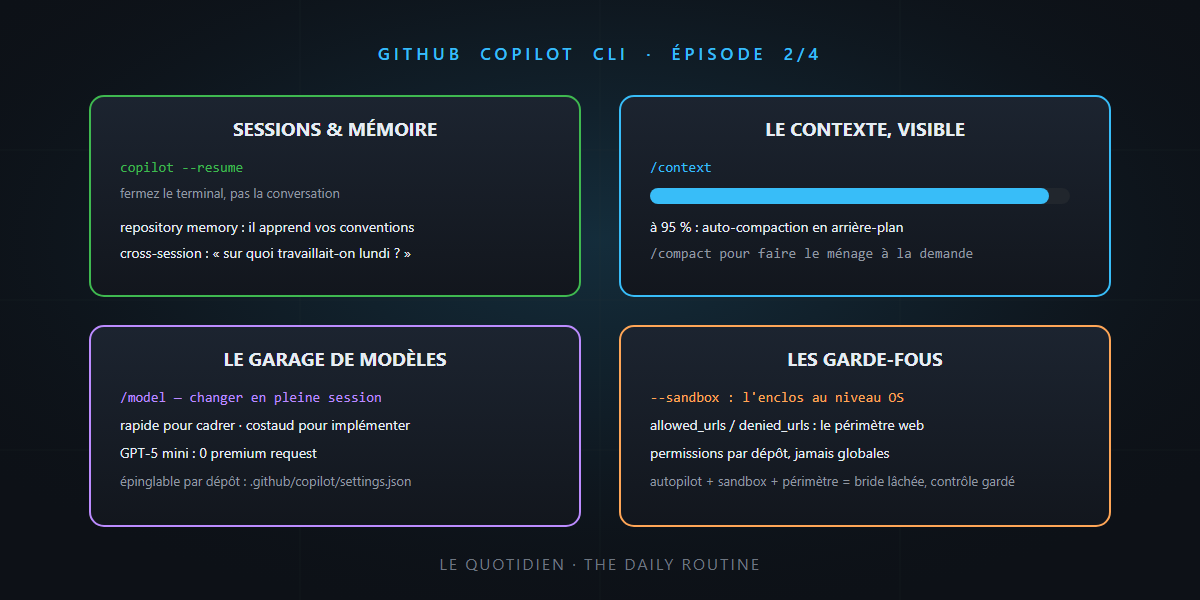
A Copilot CLI session survives everything: close the terminal, come back tomorrow, copilot --resume lists your conversations (local and remote — we’ll see remote ones in episode 4) and you pick up the exact thread — context, history, working directory included. The /clear reflex, meanwhile, resets the counters when you change topics.
Context: token theory, applied
Remember the tokens article: everything in the context is paid on every turn, and an obese context degrades answers. Copilot CLI is the tool that makes all of that visible and actionable:
/context: the live gauge — what consumes what, file by file, tool by tool. The itemized bill from the tokens article, in colors in your terminal.- Auto-compaction: approaching 95% of the window, history is automatically summarized in the background — the conversation continues without hitting the “context full” wall.
/compact: the same thing, on demand — make room before tackling a big piece.
Memory: the colleague who learns
The feature that changes your relationship with the tool: Copilot CLI remembers from one session to the next. Two levels:
- Repository memory: the conventions, patterns and preferences it discovers in your codebase (“tests use xUnit and triple A”, “endpoints go through Carter”) are remembered and reused.
- Cross-session memory: it can recall what you did in past sessions — “what were we working on last week?” now has an answer.
Remember the duo from the vibe engineering post — the prompt expresses, the repo remembers? Here’s the third level: the tool learns. Instructions remain the explicit source of truth; memory fills in the implicit.
The model garage: /model
The CLI gives access to the whole stable: Claude (Opus, Sonnet, Haiku), GPT-5.x and Codex variants, Gemini, and others arriving week after week — the exact list moves monthly. The essentials fit in three reflexes:
/modelswitches models mid-session — scope with a fast model, implement with a heavyweight, exactly the logic of the “which model to choose” article.- Reasoning effort is adjustable (up to the max tier on all plans) — and Ctrl+T shows or hides the live reasoning.
- Included models (GPT-5 mini, GPT-4.1) consume no premium requests: perfect for routine work; save the heavy artillery for what deserves it. And for full independence, BYOK mode still works — down to a 100% local model.
Team tip: in a trusted repository, .github/copilot/settings.json can pin model, effort and context tier — the project’s foundations now include its engine.
The comfort that makes you stay
The little things that make the difference after a week:
/diff: the session’s changes, fine-grained syntax highlighting, built-in search, vim navigation (g,G,Ctrl+D),wkey to hide whitespace-only changes./review: a review of your changes before the commit — the code review reflex, without leaving the terminal./refine: rewrites your rough prompt into a polished one — the tool that teaches you to talk to it better./settings: all configuration in one interactive dialog; themes (including accessibility variants) via/theme.
The guardrails: sandbox and network perimeter
Episode 1 promised guardrails for autopilot — here they are, and they’ll remind you of the security article:
- The sandbox:
--sandboxisolates shell commands at the OS level. The agent works inside a pen; leaving it requires explicit approval. Toggles hot, even mid-task. - The network perimeter:
allowed_urls/denied_urlsin the configuration control what the agent can consult — and the rules also apply to itscurlandwgetcalls. Least privilege, applied to the web. - Tool permissions persist per repository: what you allow in a trusted project doesn’t carry over elsewhere.
Autopilot + sandbox + network perimeter: that’s the trio that lets you loosen the reins without losing control.
In summary
| Need | The command |
|---|---|
| resume yesterday’s work | copilot --resume |
| see what eats the context | /context (and /compact to clean up) |
| change engines mid-drive | /model (+ reasoning effort, Ctrl+T) |
| re-read before committing | /diff, /review |
| phrase it better | /refine |
| loosen the reins safely | autopilot + --sandbox + allowed_urls |
- Sessions survive the terminal; memory survives the sessions.
- The context management from the tokens article is here visible (
/context) and automatic (compaction at 95%). - The right model for the right task, mid-session — and pinnable per repository.
See you tomorrow for episode 3: built-in agents, your own agents, skills, plugins and MCP — the moment the terminal becomes a team. Until then… it’s not rocket science.