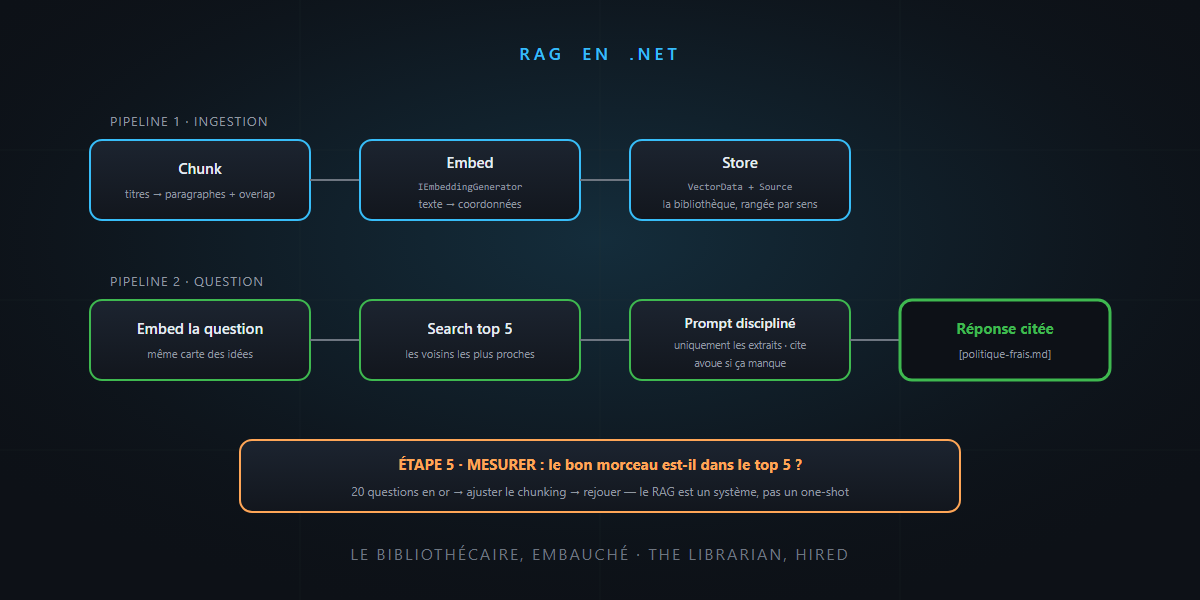
In the RAG and embeddings article, we understood the theory: the map of ideas, the library sorted by meaning, the librarian laying three excerpts on the expert’s desk. Today we actually hire him: a complete RAG in C#, with the official Microsoft.Extensions.AI abstractions — the same kind of standard interface as ILogger, but for AI.
Five steps, five short pieces of code. You’ll see: it’s not rocket science.
The minimal (and honest) architecture
A RAG, plumbing-wise, is two pipelines:
- Ingestion (every time documents change): chunk → compute embeddings → store.
- Question (every request): embed the question → find neighbors → paste them into the prompt → generate with citations.
All the quality is decided in the first one — the one people usually rush.
Step 1: chunking
No magic library required: the pragmatic strategy is to cut along the document’s structure — headings, then paragraphs — with a slight overlap so no idea gets cut in half:
public static IEnumerable<string> Chunk(string markdown, int maxChars = 1500, int overlap = 200)
{
    var sections = markdown.Split("\n## ");         // split by headings first
    foreach (var section in sections)
    {
        if (section.Length <= maxChars) { yield return section; continue; }
        for (var i = 0; i < section.Length; i += maxChars - overlap)
            yield return section.Substring(i, Math.Min(maxChars, section.Length - i));
    }
}
The two classic mistakes, already named: too big (the chunk drowns the information in noise), too small (the chunk loses its context). 1,000 to 2,000 characters per chunk is a healthy starting point — a starting point: you tune it by measuring (step 5).
Step 2: embeddings with Microsoft.Extensions.AI
The key abstraction is IEmbeddingGenerator — the standard interface behind which any provider plugs in (Azure OpenAI, OpenAI, Ollama locally…):
using Microsoft.Extensions.AI;

IEmbeddingGenerator<string, Embedding<float>> generator =
    new AzureOpenAIClient(endpoint, credential)
        .GetEmbeddingClient("text-embedding-3-small")
        .AsIEmbeddingGenerator();

var embeddings = await generator.GenerateAsync(chunks);   // text → coordinates
That’s it: your text chunks become points on the map. And thanks to the interface, switching providers tomorrow — or going local — doesn’t change your code.
Step 3: the library (the vector store)
Same philosophy on the storage side: Microsoft.Extensions.VectorData defines the abstraction, and connectors plug in behind it — in-memory to start, then Azure AI Search, SQL Server (native vector type), Qdrant, Postgres…
using Microsoft.Extensions.VectorData;

public class DocChunk
{
    [VectorStoreKey] public required string Id { get; set; }
    [VectorStoreData] public required string Text { get; set; }
    [VectorStoreData] public required string Source { get; set; }   // for citations!
    [VectorStoreVector(1536)] public ReadOnlyMemory<float> Vector { get; set; }
}

var collection = vectorStore.GetCollection<string, DocChunk>("docs");
await collection.EnsureCollectionExistsAsync();
await collection.UpsertAsync(chunkRecords);
Note the Source field: the originating file and section travel with each chunk. That’s what will enable citations — non-negotiable since the hallucinations article.
Step 4: the question — retrieve, augment, generate
// 1. The question becomes a point on the same map
var queryVector = await generator.GenerateAsync(question);

// 2. Retrieve: the 5 nearest neighbors
var results = collection.SearchAsync(queryVector, top: 5);

// 3. Augment + generate: the librarian lays the excerpts on the desk
var excerpts = string.Join("\n---\n",
    await results.Select(r => $"[{r.Record.Source}] {r.Record.Text}").ToListAsync());

var answer = await chatClient.GetResponseAsync(
    $"""
    Answer the question using ONLY the excerpts below.
    Cite the source [in brackets] after each claim.
    If the excerpts are not sufficient, say so explicitly.

    Excerpts:
    {excerpts}

    Question: {question}
    """);
The three lines of the final prompt are your best guardrails: only the excerpts (grounding), cite the source (verifiability), admit when it’s not enough (the honest exit, rather than plausible embroidery).
Step 5: measure — a RAG is a system, not a one-shot
The moment the evals article meets this one: RAG quality is tuned by measuring the search, not by switching models. The minimal golden dataset: twenty real questions, and for each one, the chunk that should come up:
evals/rag-001.json  { "question": "expense reimbursement deadline?",
                      "should_retrieve": "expense-policy.md#reimbursements" }
The starting metric fits in one sentence: is the right chunk in the top 5? If not — adjust the chunking, the size, the neighbor count… and replay. It’s exactly the evals regression loop, applied to the library. (The next level — hybrid semantic + keyword search, re-ranking — exists and helps; start by measuring, and you’ll know whether you need it.)
In summary
- A .NET RAG = two pipelines: ingestion (chunk → embed → store) and question (embed → search → cited prompt).
Microsoft.Extensions.AIandMicrosoft.Extensions.VectorData: standard abstractions — the embedding provider and vector database can be swapped without rewriting the application.- Chunking follows the document’s structure; the source travels with each chunk (citations required).
- The assembly prompt: only the excerpts, cite, admit what’s missing.
- And the real difference between a demo and a product: the search golden dataset — twenty questions, one metric, one improvement loop.
The librarian is hired: one embeddings interface, a library sorted by meaning, a disciplined prompt and twenty control questions. And that, honestly… is not rocket science.