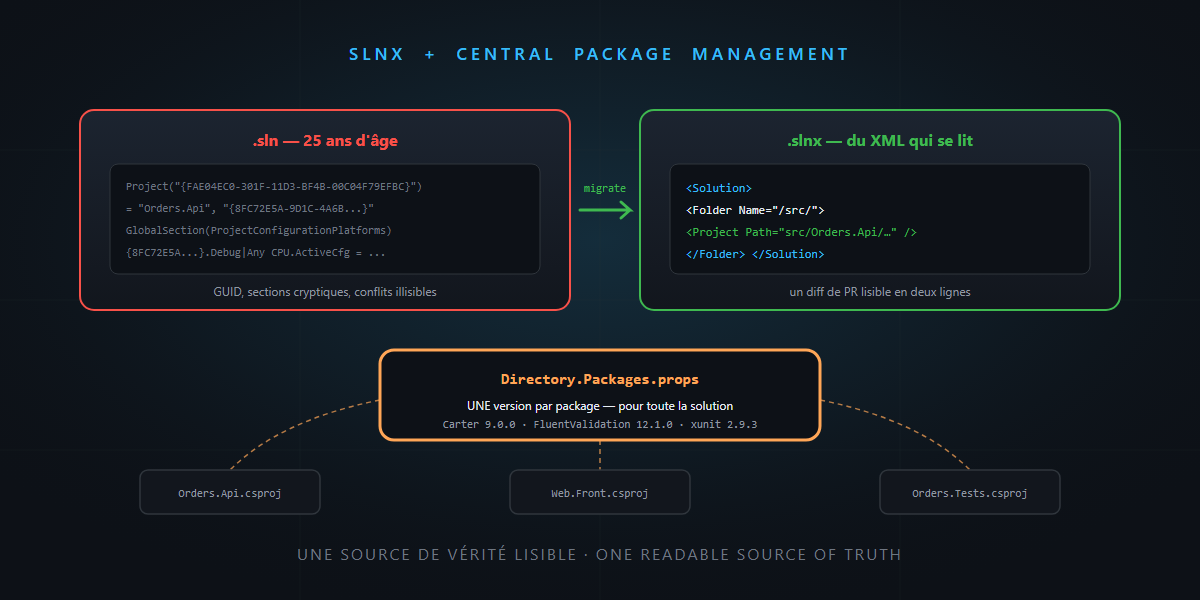
Two instructions from the base prompt never got their user manual: “solution in .slnx format” and “NuGet Central Package Management”. Fixed today, express format: two five-minute migrations that make your repository more readable for humans — and for agents. Timer started: it’s not rocket science.
Migration 1: from .sln to .slnx
Open a .sln file: a 25-year-old proprietary format, GUIDs everywhere, cryptic sections — and the all-category champion of the unreadable merge conflict. Its successor .slnx is the same content in minimal XML:
<Solution>
  <Folder Name="/src/">
    <Project Path="src/Orders.Api/Orders.Api.csproj" />
    <Project Path="src/Web.Front/Web.Front.csproj" />
  </Folder>
  <Folder Name="/tests/">
    <Project Path="tests/Orders.Tests/Orders.Tests.csproj" />
  </Folder>
</Solution>
The migration fits in one command:
dotnet sln MySolution.sln migrate
You get the .slnx next to it; check everything builds, delete the old .sln, commit. Support has been around for a while now — Visual Studio (17.14+), the dotnet CLI, Rider, VS Code — so no tooling excuse left.
Why it matters beyond aesthetics: a PR diff on a .slnx can be read (“one project added”, visible in two lines); a merge conflict can be resolved by hand without cold sweat; and an agent that must add a project to the solution edits obvious XML instead of juggling GUIDs. Readability is a feature.
Migration 2: Central Package Management
You know the symptom: Newtonsoft.Json at 13.0.1 in one project, 13.0.3 in another, a lingering NU1603 warning, and nobody knows which version is the truth. One solution, N projects, N truths.
CPM flips the logic: all versions in a single file at the root, Directory.Packages.props:
<Project>
  <PropertyGroup>
    <ManagePackageVersionsCentrally>true</ManagePackageVersionsCentrally>
  </PropertyGroup>
  <ItemGroup>
    <PackageVersion Include="Carter" Version="9.0.0" />
    <PackageVersion Include="FluentValidation" Version="12.1.0" />
    <PackageVersion Include="xunit" Version="2.9.3" />
  </ItemGroup>
</Project>
…and the .csproj files keep only the reference, without the version:
<ItemGroup>
  <PackageReference Include="Carter" />
  <PackageReference Include="FluentValidation" />
</ItemGroup>
Manual migration in three moves (ten minutes on an average solution): create the file, move every Version= into it, remove the Version attributes from the csproj files. Two options worth knowing:
VersionOverride: the owned exception — this project needs a different version, and it shows explicitly.GlobalPackageReference: the package injected everywhere (analyzers, source generators) — perfect for tooling the whole solution at once, base-prompt analyzers included.
The vibe engineering dividend
These two migrations are cousins: they replace scattered and unreadable with one readable source of truth — and you know the tune:
- “Update FluentValidation everywhere” becomes, for an agent, editing one line in one file — instead of a csproj hunt with the risk of missing one.
- Dependabot and Renovate open one-line PRs, reviewable in three seconds.
- And the security audit (remember slopsquatting) happens on one file: what enters the solution is visible in a single place.
The two honest traps: the CPM migration is done in one go (a half-migrated project = cascading NU1008 errors — block ten minutes, not two sprints); and transitive versions stay outside the file by default (the CentralPackageTransitivePinningEnabled option exists to pin those too — enable it knowingly).
In summary
.slnx:dotnet sln migrate, five minutes — readable diffs and resolvable conflicts.- CPM:
Directory.Packages.props, ten minutes — one version per package, for the whole solution. VersionOverridefor the explicit exception,GlobalPackageReferencefor analyzers everywhere.- The recurring theme: one readable source of truth serves humans in PRs… and agents on assignment.
Two files modernized, a quarter of an hour, and your repository gains clarity for the next ten years. And that, honestly… is not rocket science.