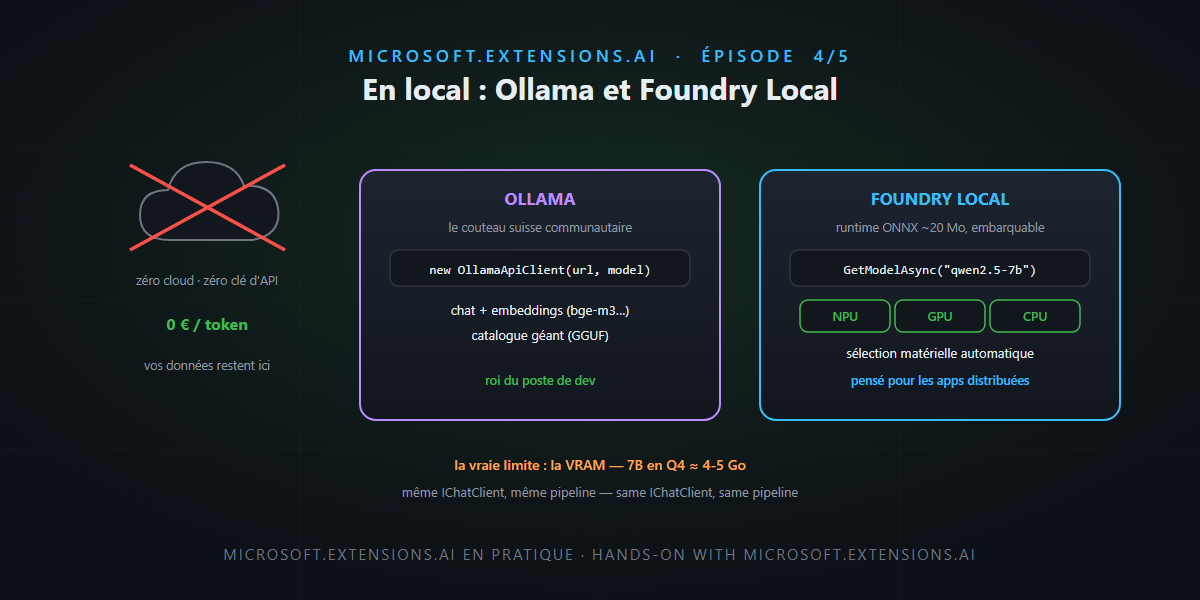
Data that must not leave the building, a demo on a train with no Wi-Fi, a token budget going through the roof, or the simple joy of tinkering at night without a meter running: there is no shortage of reasons to run an LLM on your own machine. This episode’s good news: thanks to Microsoft.Extensions.AI, your application doesn’t see the difference — local is just one more IChatClient in the socket from episode 3.
Two engines share the field: Ollama, the community Swiss Army knife, and Foundry Local, Microsoft’s hardware-optimized answer. We set up both, compare them, and face the awkward question: VRAM. Not rocket science.
Ollama: the de facto standard
One-command install, a huge catalog (Llama, Qwen, Mistral, Phi, DeepSeek…), and a local HTTP server on port 11434. On the .NET side, OllamaSharp implements both MEAI interfaces — chat and embeddings:
using Microsoft.Extensions.AI;
using OllamaSharp;

// ollama pull qwen2.5:7b && ollama pull bge-m3
IChatClient chat = new OllamaApiClient(
    new Uri("http://localhost:11434/"), "qwen2.5:7b");

IEmbeddingGenerator<string, Embedding<float>> embeddings =
    new OllamaApiClient(new Uri("http://localhost:11434/"), "bge-m3");
Everything we built in episode 2 — UseFunctionInvocation, GetResponseAsync<T>, telemetry — applies as-is. And if yours is an Aspire shop, the CommunityToolkit orchestrates the Ollama container and injects the client from a single AddOllamaApiClient.
Foundry Local: hardware optimization as standard
Foundry Local attacks the same problem from the hardware angle: an ONNX runtime of about 20 MB to embed in your application, a catalog of quantized models (Phi, Qwen, DeepSeek, GPT-OSS, Whisper), and above all automatic selection of the best variant for the host machine — Qualcomm NPU, NVIDIA GPU or CPU, without a line of detection code on your side. On Windows, the Microsoft.AI.Foundry.Local.WinML package rides on Windows ML; a cross-platform package covers macOS/Linux.
using Microsoft.AI.Foundry.Local;
using OpenAI;
using System.ClientModel;

await FoundryLocalManager.CreateAsync(new Configuration
{
    AppName = "blog-demo",
    Web = new Configuration.WebService { Urls = "http://127.0.0.1:52495" }
});
var mgr = FoundryLocalManager.Instance;

var catalog = await mgr.GetCatalogAsync();
var model = await catalog.GetModelAsync("qwen2.5-7b");   // alias → hardware-matched variant
await model.DownloadAsync();      // downloaded and cached on first run
await model.LoadAsync();
await mgr.StartWebServiceAsync(); // local OpenAI-compatible endpoint

// And now, back on familiar ground:
IChatClient client = new OpenAIClient(
        new ApiKeyCredential("notneeded"),
        new OpenAIClientOptions { Endpoint = new Uri("http://127.0.0.1:52495/v1") })
    .GetChatClient(model.Id)
    .AsIChatClient();             // ← the same bridge as in previous episodes
The alias does the smart work: qwen2.5-7b fetches the QNN variant on a Snapdragon, CUDA on an RTX, CPU otherwise. A native in-process SDK also exists (no web server) for embedded application scenarios.
The match-up
| Ollama | Foundry Local | |
|---|---|---|
| Catalog | huge, community-driven (GGUF) | curated, Microsoft-quantized/optimized (ONNX) |
| Hardware | GPU/CPU (Metal, CUDA, ROCm) | NPU + GPU + CPU, auto-selection (WinML) |
| .NET integration | OllamaSharp (chat + embeddings) |
native SDK + OpenAI endpoint → AsIChatClient() |
| Embeddings | yes (bge-m3, nomic-embed…) | catalog focused on chat/audio — embeddings via Ollama |
| App distribution | Ollama installed alongside | runtime embedded (~20 MB) in YOUR app |
| Best for | dev machines, team servers | shipped Windows apps, heterogeneous fleets |
The two coexist happily: Ollama for embeddings and dev comfort, Foundry Local to embed inference in a shipped application.
The awkward question: VRAM
A local model is graphics memory first. The order of magnitude to remember: a 7B quantized to 4 bits ≈ 4-5 GB of VRAM, a 14B ≈ 9-10 GB, a 70B doesn’t fit in your laptop. Add the KV cache growing with context — we priced all of this in the economics of inference. Moral: size the model for the task, not the ego. A well-tooled Qwen 2.5 7B delivers excellent triage, extraction and internal RAG.
The other local snag: uneven tool calling. Small models don’t all call functions cleanly — favor families that support it well (Qwen 2.5, Llama 3.1+), test ToolChoice, and keep your evals as the referee. That’s exactly the kind of choice we’ll put back on the table tomorrow in the production RAG.
A word of honesty
- A local 7B doesn’t replace a frontier model: on long reasoning, chained tool-call reliability or complex structured outputs, the gap is real and measurable. The winning pattern is often hybrid: local for the bulky and the sensitive, cloud for the hard — and MEAI makes the routing trivial (keyed services, episode 3).
- Foundry Local’s WinML package is Windows-first; the macOS/Linux experience goes through the younger cross-platform package. Test on your actual targets before promising.
In short
- Local is an
IChatClientlike any other: OllamaSharp directly, Foundry Local through its OpenAI-compatible endpoint +AsIChatClient(). - Ollama: giant catalog, embeddings included, king of the dev machine. Foundry Local: embeddable ~20 MB runtime, auto NPU/GPU/CPU, built for shipping apps.
- Sizing rule: 7B Q4 ≈ 4-5 GB of VRAM — and the KV cache eats the rest.
- Local tool calling: Qwen 2.5, Llama 3.1+, and evals to decide.
- Winning pattern: local for volume and sensitivity, cloud for difficulty — same code.
Tomorrow, the finale: we assemble the whole series into a production RAG — a multilingual order bot, Qdrant, and the six classic pitfalls (blind top-K, arbitrary chunking, badly filtered entities…) with their fixes. And that, honestly… is not rocket science.