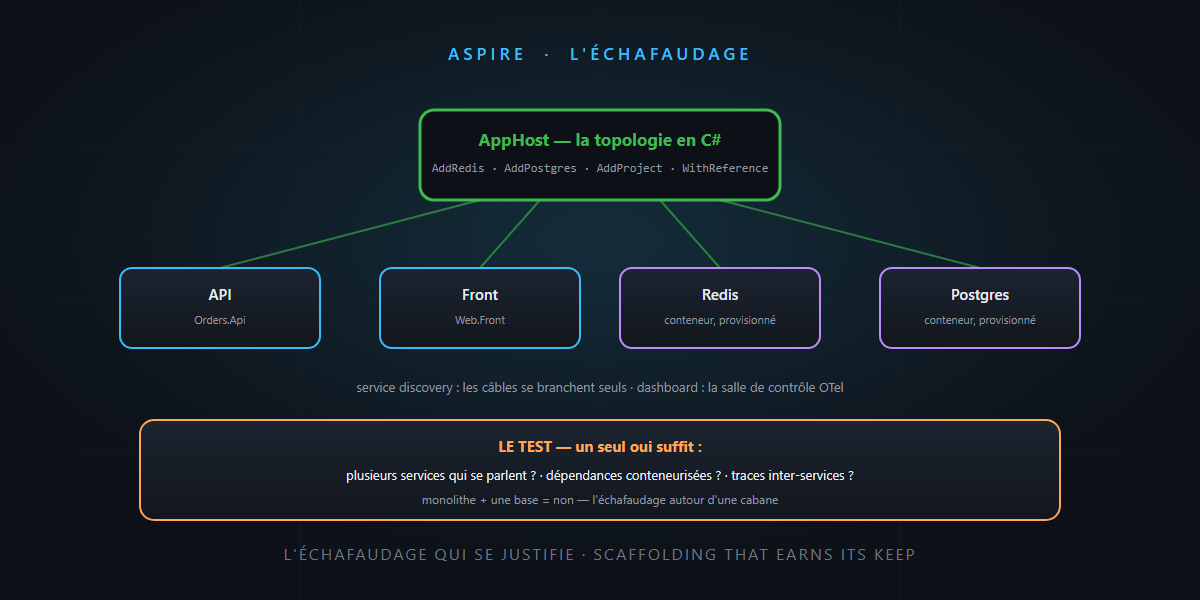
In the vibe engineering base prompt, one line intrigued readers: “If complexity justifies it: .NET Aspire. Otherwise, keep it simple.” Several of you asked for the criterion — and, deep down, what Aspire really does.
So today: Aspire explained through the construction-site image, the minimal code, and above all the three-question test to know whether your project justifies it. You’ll see: it’s not rocket science.
The problem: pressing F5 on a distributed application
As long as your application is a Blazor monolith with its database, all is well: F5, it runs. Then the project grows: an API, a front end, a background worker, a Redis cache, a Postgres… and your “local startup” becomes a ritual: four terminals, a docker-compose, connection strings copied into as many appsettings.json, and the classic “works on my machine” when someone new joins the project.
The problem isn’t the code — each service is clean. It’s the site around it: who starts what, in which order, wired how. What’s missing is scaffolding.
Aspire: the dev-time site manager
Aspire (formerly “.NET Aspire”, renamed as it went polyglot) is not a framework that invades your business code. It’s an orchestration and observability layer around your services, with four pieces:
- The AppHost: a small C# project that describes your distributed application — which services, which dependencies, which wiring. Your topology becomes code: typed, versioned, reviewed in PRs.
- Service discovery: services find each other by logical name. No more hard-coded URLs and ports — the cables plug themselves in.
- Integrations: Redis, Postgres, RabbitMQ, Azure… preconfigured with health checks, retries and telemetry included — serious tooling by default.
- The dashboard: the control room — logs, traces, metrics of all services on a single screen. You’ve already met it in the observability article: it’s the same one, OpenTelemetry as standard.
The code: your topology on one page
Our small company’s AppHost looks like this:
var builder = DistributedApplication.CreateBuilder(args);

var cache    = builder.AddRedis("cache");
var postgres = builder.AddPostgres("db").AddDatabase("orders");

var api = builder.AddProject<Projects.Orders_Api>("api")
    .WithReference(postgres)
    .WithReference(cache);

builder.AddProject<Projects.Web_Front>("front")
    .WithReference(api);

builder.Build().Run();
One aspire run (or F5 on the AppHost), and everything starts: the Redis and Postgres containers are provisioned, connection strings injected, the dashboard opened. The new developer — or the agent landing on the repo — no longer has a ritual to learn: the topology is in the code. And on deployment day, azd up reads that same description to provision Azure Container Apps.
The test: does complexity justify it?
The promised criterion, in three questions — one yes is enough:
- Do you have several services talking to each other (API + front + worker…)?
- Do you have containerized dependencies locally (database, cache, bus…)?
- Do you need to follow a request across several services (distributed traces)?
| Your project | Verdict |
|---|---|
| Blazor monolith + one database | No — a docker-compose (or nothing) is enough; Aspire would be scaffolding around a cabin |
| API + front + cache + worker | Yes — that’s exactly the nominal case |
| Multi-service agent system (RAG + MCP + API) | Yes — and the dashboard traces your agents for free |
The word of honesty: Aspire adds a project, concepts and a learning curve — a real cost on a small project. And scaffolding doesn’t replace foundations: Aspire organizes the site, not the building — the slicing remains your job. The two complement each other, they don’t substitute.
In summary
- Aspire = the site’s scaffolding: AppHost (the topology in C#), service discovery (automatic cables), integrations (serious dependencies by default), dashboard (the OTel control room).
- The three-question test: several services? containerized dependencies? cross-service traces? — one yes, and the scaffolding earns its keep.
- A monolith doesn’t need it — and that’s fine: keep it simple is an architecture instruction, not a confession.
- Bonus: the same description powers deployment (
azd up→ Container Apps) and your agents’ observability.
The base prompt’s line now has its user manual: scaffolding when the building deserves it, none for the cabin. And that, honestly… is not rocket science.