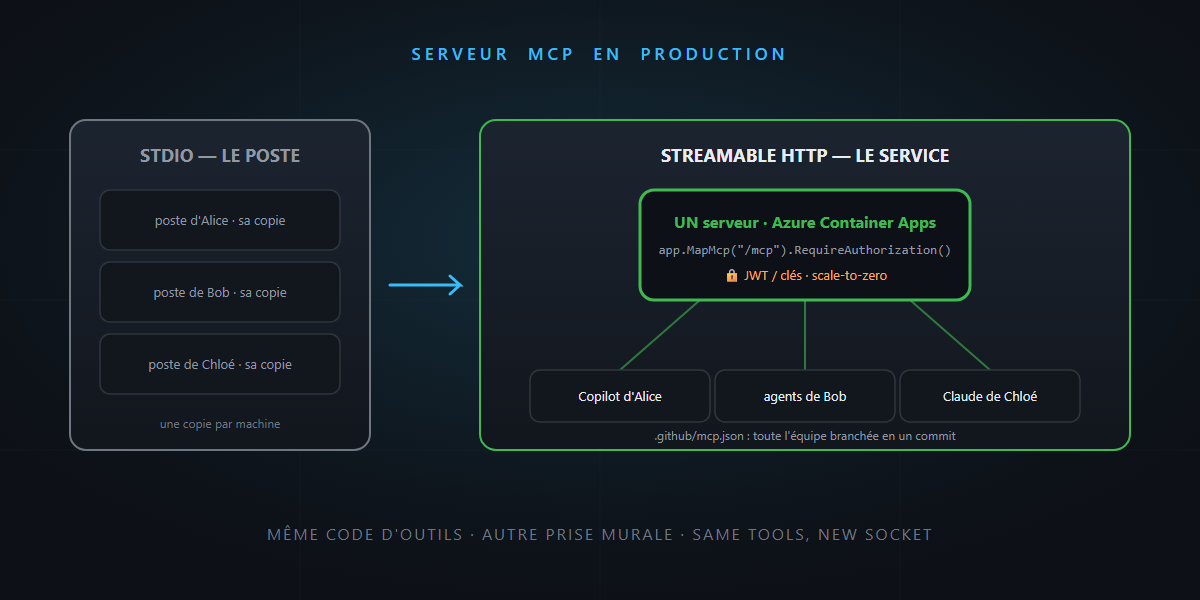
In the first MCP article, we built the universal plug: a server in thirty lines, over STDIO, on your machine. And I promised the sequel: “Streamable HTTP when you need to share.”
You need to share. Your stock server works so well that the whole team wants it — and so does the sales rep, from his Copilot. A remote, shared, authenticated, deployed MCP server: that’s today’s program. You’ll see: it’s not rocket science.
STDIO has a limit: it’s a workstation tool, not a service
Remember the mechanics: with STDIO, the client launches your server as a child process. Consequences: one copy per user, on every machine, with everyone’s own permissions and configuration. For a personal tool, perfect. For a team server — the stock database, the product catalog — you need the opposite: one server, somewhere, and every client plugging into it.
That’s the role of the Streamable HTTP transport. In passing: if you come across old tutorials about the “SSE” transport, keep walking — it’s deprecated, Streamable HTTP replaces it.
The same server, over HTTP: ten lines change
The beauty of it: your tools don’t change by a single character. Only the wiring changes — from a Host console to an ASP.NET application:
dotnet new web -n MyMcpServer
dotnet add package ModelContextProtocol.AspNetCore
var builder = WebApplication.CreateBuilder(args);

builder.Services
    .AddMcpServer()
    .WithHttpTransport()
    .WithToolsFromAssembly();   // your StockTools, unchanged

var app = builder.Build();

app.MapMcp("/mcp");             // the MCP endpoint lives at /mcp

app.Run();
Your StockTools class from the previous article — attributes, descriptions, logic — copies over as is. Same tool code, different wall socket. Immediate bonus: no more stdout trap — over HTTP, Console.WriteLine becomes harmless again (but keep real logs, more on that below).
Stateful or stateless: the architecture decision
The HTTP transport has a structural choice STDIO didn’t have:
- Stateful (default): the server keeps a session per client. Required for features where the server solicits the client — sampling, elicitation, notifications.
- Stateless (
options.Stateless = true): every request is independent — essential for horizontal scaling (multiple instances behind a load balancer, scale-to-zero), but server-to-client features stop working.
The simple rule: a classic tool server (tools that get called, period) → stateless, and scale away. A server that dialogues (asks for approvals, pushes notifications) → stateful, with session affinity. Record the choice in an ADR — it’s typically a decision you pay for later.
Authentication: it’s just ASP.NET
The hidden good news of the HTTP transport: your MCP endpoint is an ASP.NET endpoint like any other. Your entire usual toolbox applies — no exotic machinery to learn:
builder.Services.AddAuthentication(JwtBearerDefaults.AuthenticationScheme)
    .AddJwtBearer(o => { /* your authority: Entra ID, etc. */ });

app.MapMcp("/mcp").RequireAuthorization();
On the client side, MCP configurations accept HTTP headers (Bearer token, API key) — Copilot CLI even offers a form to enter them, and OAuth is handled by modern clients. Three reflexes from the security article to carry over:
- Secrets stay on the client side (environment variables, secret managers) — never hard-coded in a committed
mcp.json. - Your server revalidates everything: the model can send anything as a parameter — authentication doesn’t replace input validation.
- No secrets in responses: everything a tool returns goes into the model’s context — and potentially into transcripts.
Deployment: a container like any other
An HTTP MCP server deploys like any ASP.NET API. The shortest path today: Azure Container Apps —
az containerapp up --name mcp-stock --source . --ingress external --target-port 8080
Why Container Apps rather than something else: HTTPS included, scale-to-zero (a team MCP server sleeps 90% of the time — no reason to pay for it), and internal ingress if the server should only be reachable from your network — for a corporate server, often the right default. The classic alternatives (App Service, Functions for simple servers, AKS if you’re already there) work too — it’s ASP.NET, now and always.
The last mile: distribution. Once the URL is stable, .github/mcp.json in the team’s repositories:
{
  "servers": {
    "stock": { "type": "http", "url": "https://mcp-stock.demo.azurecontainerapps.io/mcp" }
  }
}
…and every agent on the team inherits the wiring. Written once, deployed once, plugged in everywhere.
The word of honesty: you just published an API of actions
A remote MCP server is a public API whose calls are decided by LLMs. Treat it with matching seriousness:
- Least privilege: the stock server reads stock; it doesn’t hold the write connection string if no tool writes.
- Log the calls (who, which tool, which parameters) — that’s your audit trail, and the raw material for the observability article coming up.
- Rate limit: an agent stuck in a loop can hammer a tool — a standard ASP.NET rate limiter does the job.
- Version the catalog: renaming a tool breaks every prompt that refers to it; the descriptions are part of the contract.
In summary
- STDIO = workstation tool; Streamable HTTP = team service — and your tool classes copy over unchanged (
WithHttpTransport()+MapMcp()). - Stateless to scale (tool servers), stateful to dialogue (sampling, elicitation) — an ADR is in order.
- Authentication and deployment are standard ASP.NET: JWT/keys in headers, a container on Container Apps, scale-to-zero.
- Distribution via
.github/mcp.json: the whole team wired up in one commit. - And the seriousness of a real API: least privilege, validation, logs, rate limiting, versioning.
From a console on your machine to a team service on Azure, without rewriting a single tool: the universal plug keeps its promise. And that, honestly… is not rocket science.