In episode 3 of the Copilot CLI series, we met the team: Explore, Task, Plan, Code-review, and your own agents in .agent.md. Several readers gave me the same feedback: “fine, the team exists — but how do I actually use it?”
Today, the full user manual: how a subagent works under the hood, how to split a real development task across its whole lifecycle, and — the part you’ve been waiting for — ready-to-use prompts for each subagent. You’ll see: it’s not rocket science.
Under the hood: an employee on assignment, not a colleague in the loop
A subagent, mechanically, is a separate conversation: its own context (its own desk), its own job description, its allowed tools — and since /subagents, its own model and reasoning effort. The lifecycle takes three beats:
- The brief: the main agent (or you) hands it a mission, with whatever information it deems useful.
- The mission: the subagent works in isolation — it explores, executes, reads what it wants… in its context.
- The synthesis: it returns one report. Everything else — its 50,000 tokens of exploration — dies with it.
And from this mechanism follows the rule that changes everything: the subagent does not see your conversation. It knows only what the brief tells it. Symmetrically, you will know only what its synthesis reports. A subagent is not a colleague who’s in the loop — it’s a contractor on assignment: the quality of the result is capped by the quality of the work order.
Why put up with that? You already know the three answers: preserved context (exploration never pollutes your main desk), parallelism (several missions at once), and specialization (a narrow job description executes better than an overloaded generalist).
The standard split: one feature, six missions
Let’s take the running example from the vertical slices article: adding AddOrderNote — a text note on an order. Here’s the full lifecycle, split into missions:
| Phase | Subagent | Its mission | What it returns |
|---|---|---|---|
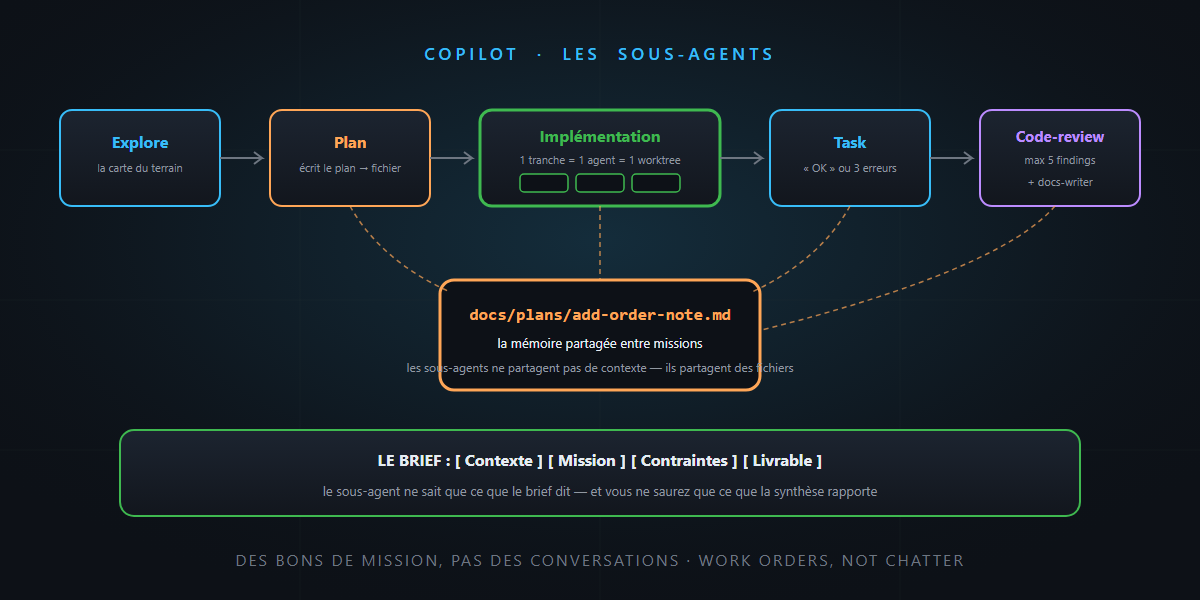
| 1. Explore | Explore | understand the existing code | the map of the terrain |
| 2. Scope | Plan | produce the plan | a numbered plan, written to a file |
| 3. Implement | the main agent (or one agent per slice) | code following the plan | the code |
| 4. Verify | Task | build + tests | brief verdict, or the errors |
| 5. Review | Code-review | hunt real issues | max 5 findings, ranked |
| 6. Record | a custom docs agent | ADR + feature doc | the updated files |
Notice point 2: the plan is written to a file (docs/plans/add-order-note.md), not just said in conversation. That’s THE central pattern of multi-agent work — externalization applied to coordination: the plan file becomes the shared memory that every following mission receives as a reference. Subagents don’t share context; they share files.
The prompts, phase by phase
The anatomy of a good brief has four blocks — because the subagent starts from zero, every block counts: [Context] [Mission] [Constraints] [Deliverable].
Phase 1 — Explore (understand before touching):
Explore
Features/Orders/and theCreateOrderslice in particular. Mission: understand the pattern of a vertical slice in this project. Deliverable: the list of files a slice is made of with their roles, the naming conventions, and the specific traps you spot (validation, transactions…). Don’t propose a solution yet — I want the map, not the route.
Phase 2 — Plan (scope, and write the plan to disk):
Context: see the exploration synthesis above. We’re adding
AddOrderNote: a text note (max 500 characters) on an existing order. Mission: produce an implementation plan using theCreateOrderslice as the model. Constraints: no new NuGet dependency; the command fails if the target order doesn’t exist; AAA tests included. Deliverable: write the plan todocs/plans/add-order-note.md— numbered steps, files to create, and an “open questions” section if you have any.
Phase 3 — Implementation (the main agent keeps the wheel, the plan is the contract):
Implement steps 1 to 4 of
docs/plans/add-order-note.md. Constraints: touch onlyFeatures/Orders/AddOrderNote/; reproduce the structure ofCreateOrder; if the plan turns out to be wrong on any point, stop and say so instead of improvising.
Three independent features? Three slices, three worktrees, three agents in parallel — parallelism is only safe when the perimeters are disjoint, and that’s exactly what slices guarantee.
Phase 4 — Task (verify, without drowning the context):
Run
dotnet buildthendotnet teston the solution. Deliverable: if everything is green, answer “OK” with the test count and duration. Otherwise, the first three errors with file:line and your hypothesis of the cause — not the full log.
Phase 5 — Code-review (signal, not noise):
Review the diff of the current branch against
main. Focus: error handling, input validation, consistency with theCreateOrdermodel slice, and any deviation from the plandocs/plans/add-order-note.md. Deliverable: maximum 5 findings, ranked by severity, each with file:line and a proposal. Ignore style — the analyzers handle it.
Phase 6 — the docs agent (your first custom agent):
---
name: docs-writer
description: Writes ADRs and feature docs, never touches code.
tools: ['read', 'edit']
---
You are the project's documentarian. You write ADRs in the house format
(context, options, decision, consequences — see docs/adr/) and keep
feature docs up to date. You never write code.
Then the brief: “Read docs/plans/add-order-note.md and the diff. If there’s a structural decision, write the ADR; otherwise say why not. Update the feature README.” Note the tools line: the documentarian cannot execute code — least privilege, applied to the in-house team.
The honest traps
- Over-splitting. Six subagents to rename a variable: each mission starts from zero (re-exploration, re-reading), the overhead exceeds the gain. The right criterion: delegate when the volume of intermediate work would pollute your main context — not for the pleasure of the org chart.
- The poor brief. “Look at the code and tell me what you think” → unusable synthesis, every time. Re-read the golden rule: it knows only what the brief says.
- Loss between phases. A synthesis is a chosen loss — if a nuance matters, demand it in the deliverable, or have it written into the plan file. Files survive; conversations don’t.
- False parallelism. Two agents in the same files = guaranteed conflicts. Parallelize by slices, never by layers.
In summary
- A subagent = a contractor on assignment: isolated context, a job description, one synthesis back — it knows only what the brief says.
- The lifecycle splits naturally: Explore → Plan → implementation → Task → Code-review → docs, each phase with its specialist.
- The standard brief: [Context] [Mission] [Constraints] [Deliverable] — and the deliverable specifies the format (“max 5 findings”, “OK or 3 errors”).
- The pattern that holds it all: the plan written to a file, shared memory between missions.
- Split when it protects your context, parallelize when perimeters are disjoint — vertical slices guarantee both.
A project run through subagents is a company running on work orders: clear brief, defined deliverable, concise report — and a binder of plans everyone consults. And that, honestly… is not rocket science.