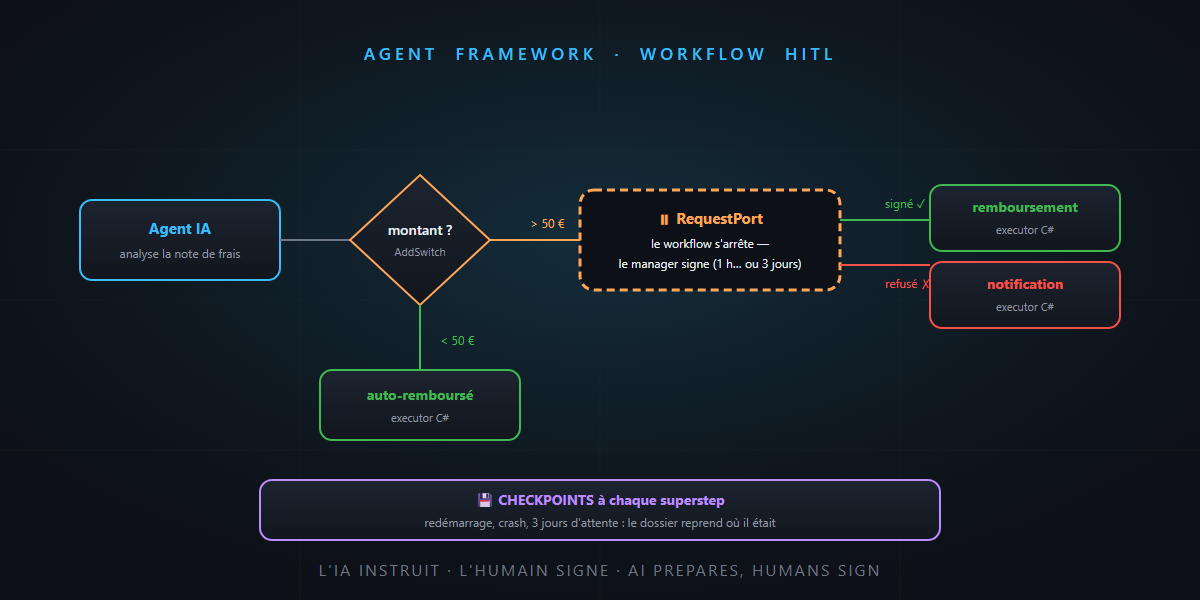
In the Agent Framework overview article, I promised that workflows let you process “the loan application automatically, while the final approval remains a human signature”. A conceptual promise — today we keep it in code.
On the menu: a real end-to-end C# workflow — the graph, conditional routing, the pause for human approval (human-in-the-loop) and the checkpointing that lets the file wait three days for its signature without losing anything. You’ll see: it’s not rocket science.
The scenario: an expense reimbursement request
Let’s stay in our small company: employees submit expense claims. The business process:
- Analyze the claim (an AI agent reads the receipts and structures the file).
- Route: under €50 → automatic reimbursement; above → manager approval.
- Wait for the manager’s signature — hours, sometimes days.
- Execute: reimburse, or notify the refusal.
A lone agent would improvise this process; here, the order of steps is the business rule. That’s workflow territory: agent for the open-ended, workflow for the procedural.
The bricks: executors and edges
An Agent Framework workflow is a typed graph: executors (the nodes — an AI agent or a plain C# function) connected by edges (the arrows, carrying typed messages). Model the messages first:
public record ExpenseClaim(string Employee, decimal Amount, string Reason);
public record ApprovalRequest(ExpenseClaim Claim, string Summary);
public record ApprovalResponse(bool Approved, string? Comments);
Then the executors — note the mix: AI where judgment is needed, C# where execution is needed:
// An AI agent analyzes the claim and produces a structured summary
var analyzer = chatClient.CreateAIAgent(
    instructions: "Analyze the expense claim and summarize it in one factual sentence.");

// Plain C# executors for the mechanics
var autoApprove   = new AutoApproveExecutor();   // reimburses directly
var reimburse     = new ReimburseExecutor();     // executes the payment
var notifyRefusal = new NotifyRefusalExecutor(); // informs the employee
The graph: reads like the process itself
using Microsoft.Agents.AI.Workflows;

// The human pause point: request ApprovalRequest, response ApprovalResponse
var managerApproval = RequestPort.Create<ApprovalRequest, ApprovalResponse>("ManagerApproval");

var builder = new WorkflowBuilder(analyzer);

builder.AddSwitch(analyzer, sw => sw
    .AddCase((ApprovalRequest r) => r.Claim.Amount < 50m, autoApprove)
    .WithDefault(managerApproval));                 // > €50: off to the manager

builder.AddEdge(managerApproval, reimburse,
    condition: (ApprovalResponse r) => r.Approved);  // signed → payment
builder.AddEdge(managerApproval, notifyRefusal,
    condition: (ApprovalResponse r) => !r.Approved); // refused → notification

var workflow = builder.WithOutputFrom(reimburse, notifyRefusal).Build();
Re-read the business process at the top, then this code: it’s the same text. The graph reads like the procedure — and the framework validates types at build time: an edge that would carry the wrong message won’t build your workflow. The mold, once again.
Human-in-the-loop: the RequestPort
The centerpiece is that RequestPort. When the file reaches it, the workflow doesn’t “block” a thread waiting for a human — it emits an event (RequestInfoEvent) and stops cleanly:
await foreach (var evt in workflow.RunStreamingAsync(claim))
{
    if (evt is RequestInfoEvent request)
    {
        // Here, YOUR application takes over:
        // show the request in the manager's app, send an actionable email…
        await approvalUi.ShowAsync(request);
    }
}
And when the manager clicks — in an hour or in three days — your application sends the response back to the workflow, which resumes exactly where it stopped and routes to reimburse or notifyRefusal. The intern assembled the file; the workflow carried the signature folder to the manager’s desk; the signature stays human. It’s tool approval at the scale of a process.
Checkpointing: the file survives the restart
Three days of waiting raises a very concrete question: what if the application restarts in between? Answer: checkpoints. The workflow executes in supersteps (rounds of the graph), and at each superstep boundary, the complete state — position in the graph, executor states, pending messages, including pending approval requests — is saved to checkpoint storage.
On resume (after a deployment, a crash, or just three days later), you reload the latest checkpoint: pending requests are re-emitted, and the file picks up where it was. Nothing in memory, everything in storage — that’s what turns a “running script” into a long-lived business process. And for serious hosting, the Durable Task extension on Azure checkpoints every step automatically, without changing the workflow definition.
Cherry on top: the workflow becomes an agent
One last move, already announced in the overview article: a workflow can be exposed as an agent — from the outside, you “talk” to it like any agent (and therefore, remember, it can even end up as an MCP server). Your complete reimbursement process, human approval and checkpoints included, becomes a pluggable tool in Copilot. The Russian dolls of agentic engineering.
The word of honesty
Agent Framework moves fast — the API names in this article match the documentation at the time of writing, but always check the official samples before copying: they are the source of truth. And an architect’s advice: only put in a workflow what’s genuinely procedural — a forty-node graph for what an agent handles with three tools is bureaucracy, not engineering.
In summary
- A workflow = a typed graph: executors (AI agents or C# functions) + edges (conditional, switch-case, fan-out/fan-in) — validated at build time.
- The RequestPort materializes human-in-the-loop: the workflow emits a request, stops cleanly, resumes on the response — the AI prepares, the human signs.
- Checkpointing by supersteps makes the process durable: restarts, deployments, three-day waits — the file never gets lost.
- And the whole thing can be exposed as an agent (even as an MCP server): the process becomes a building block.
The file assembled by AI, the signature folder waiting on the manager’s desk, and archiving that survives everything: your business process fits in one page of readable C#. And that, honestly… is not rocket science.