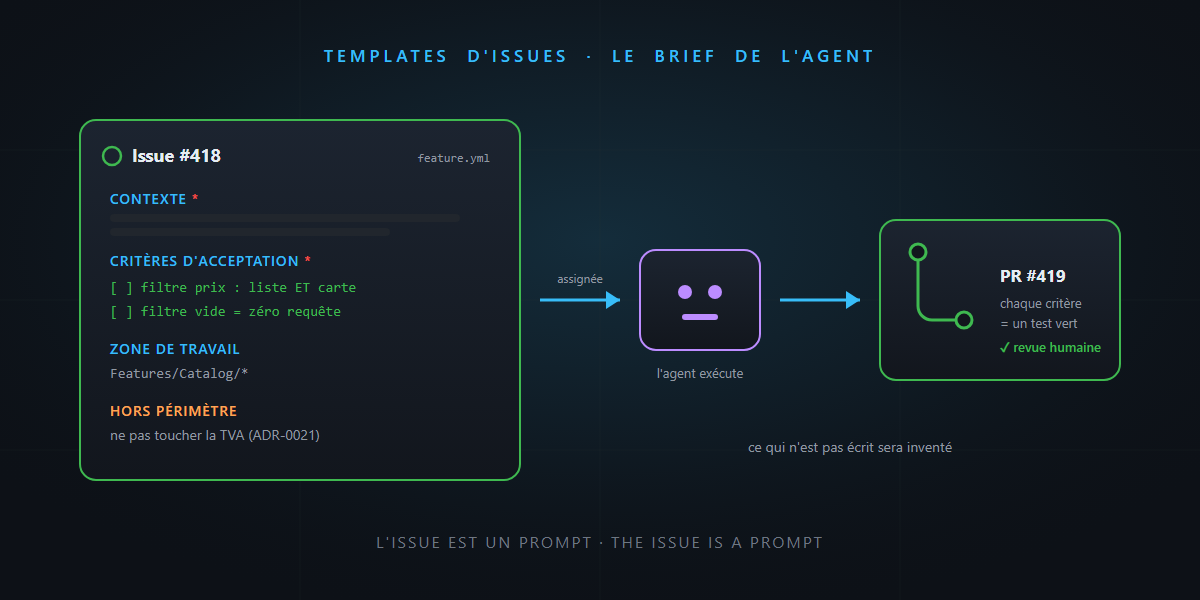
A classic GitHub issue: “The filter doesn’t work well on mobile, please fix.” Assigned to a human, it triggers three rounds of questions — painful but recoverable. Assigned to an AI agent, it triggers… a pull request. The agent won’t stop by your desk to ask “what exactly is not well?”: it will assume, with aplomb, and deliver you the wrong fix, neatly tested.
In the subagents article, we saw that the quality of a delegation is decided in the brief. Today we institutionalize it: the issue template, that slightly forgotten old GitHub tool, has become the prompt template of your agents. You’ll see: it’s not rocket science.
The issue changed readers
For fifteen years, an issue was a note to a colleague: missing context was recovered at the coffee machine, implicit assumptions were tolerated. That contract just changed: an issue can now be executed — assigned to a coding agent that will clone, code, test and open a PR without asking a single intermediate question.
The issue has therefore become a prompt. And everything we know about prompts applies: context matters, ambiguity costs, and what isn’t said will be invented. The difference with chat: the issue is asynchronous — no conversational catch-up. The brief must be complete before departure.
Good news: GitHub already has the tool to enforce a complete brief — issue forms, structured YAML templates in .github/ISSUE_TEMPLATE/.
The template designed for an agent
# .github/ISSUE_TEMPLATE/feature.yml
name: Feature
description: A task executable by a human or an agent
body:
  - type: textarea
    id: context
    attributes:
      label: Context
      description: The business problem, not the technical solution
    validations:
      required: true
  - type: textarea
    id: acceptance
    attributes:
      label: Acceptance criteria
      description: Verifiable list — every line must be testable
      placeholder: |
        - [ ] The price filter applies to the list AND the map
        - [ ] An empty filter sends no request
    validations:
      required: true
  - type: textarea
    id: area
    attributes:
      label: Work area
      description: Files, folders or slice concerned (to the best of your knowledge)
  - type: textarea
    id: out-of-scope
    attributes:
      label: Out of scope
      description: What must NOT be touched, and why
Four sections, four precise functions:
| Section | What it prevents |
|---|---|
| Context (the problem, not the solution) | the agent optimizing a wrong interpretation |
| Verifiable acceptance criteria | the self-declared “done” — every checkbox becomes a test |
| Work area | twenty minutes of exploration, and off-topic modifications |
| Out of scope | the surprise three-thousand-line refactoring “while we’re at it” |
The “out of scope” section is the most profitable and the least common. A human senses implicit boundaries; an agent only knows explicit ones. “Don’t touch the VAT calculation (see ADR-0021), don’t migrate the legacy calls” — two lines that save a painful PR review.
Acceptance criteria: the reactor core
Look at the mechanics end to end: a well-written acceptance criterion successively becomes the agent’s plan, its tests, and your review checklist. Three uses for one line — provided it’s verifiable:
- ❌ “The filter must work well on mobile” — unverifiable, therefore unverified.
- ✅ “On a screen < 640 px, the filter panel opens as a drawer and the Apply button stays visible without scrolling” — the agent knows what to build, the test knows what to check, the reviewer knows what to look at.
It’s exactly the required deliverable logic from the subagents post, moved into the tracking tool — where the whole team sees it.
Why it’s worth double in the AI-agent era
- The template is a guardrail for the human writer. The
requiredfields turn “the filter doesn’t work” into a complete brief — the friction is in the right place: two minutes at writing time rather than a failed-PR round-trip. - A well-formed issue becomes delegable as-is.
/delegatefrom Copilot CLI or an assignment to the coding agent: if the brief is in the issue, delegation is one click. If the brief is in your head, every delegation becomes a writing session again. - AI helps upstream too. “Turn this fuzzy customer request into an issue following our template”: the agent structures, you validate the acceptance criteria — the usual division of labor. Some teams even have an agent that reviews incoming issues and flags hollow sections before a human (or another agent) wastes time on them.
The honest word
- A template doesn’t replace judgment. Filling in “out of scope: nothing in particular” to go faster is sabotaging the tool. The template structures the thinking; it doesn’t do it for you.
- Too many fields kill the template. Twelve required sections and people work around it (or fill in garbage, which is worse). Four well-chosen sections are enough — selectivity, again.
- Not every issue is for an agent. An open exploration (“investigate the dashboard slowness”) is briefed differently from a closed task. Make two templates: executable task (the form above) and investigation (symptoms, leads, definition of “solved”).
In summary
- An issue is no longer a note to a colleague: it’s potentially a prompt executed as-is by an agent — the implicit no longer forgives.
- GitHub issue forms (
.github/ISSUE_TEMPLATE/*.yml) enforce the complete brief: context, verifiable acceptance criteria, work area, out of scope. - A well-written acceptance criterion serves three times: agent’s plan, test, review checklist. “Out of scope” is the most profitable section — implicit boundaries don’t exist for a machine.
- And AI helps on both sides: it structures fuzzy requests into clean issues, and it executes clean issues into PRs.
Tomorrow we look at exactly what happens after the assignment: the GitHub coding agent, from issue to pull request. Today’s template is tomorrow’s fuel. Until then… it’s not rocket science.